

Clipboard History Manager
8 ratings
)

Overview
A full-featured desktop clipboard manager for Mac, Windows and Linux to record what you copy to the clipboard
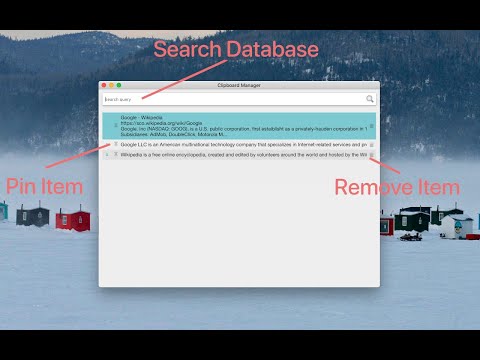
A powerful desktop clipboard manager with a fast, searchable local database that can store hundreds of clipboard entries without any performance drawbacks. CAPTURE MODES On first run, the extension explicitly asks you to select one of four collection modes, and you can switch between them at any time without losing your history: 1. Native Client (Global): a very simple native component written in C++ monitors clipboard changes system-wide and notifies the extension about each change. This way, the extension never polls the system clipboard (no continuous checking with a fixed interval), and it is notified even if the clipboard content is changed by a process outside your browser environment. 2. Browser + System (No Helper Needed): collects clipboards of all applications for as long as the browser is running. No installation is needed. The polling interval is fully configurable (from 1 to 60 seconds). 3. Browser + System Events (ChromeOS only): gets notified by the operating system whenever the clipboard of any application changes. Nothing is polled in the background at all. This mode is automatically disabled on platforms that do not support it. 4. Content Script (Browser Only): collects clipboard entries made inside the pages of your browser only. The optional native component is open-source and is compiled with the sources available at: https://github.com/lunu-bounir/clipboard-helper/commits/master/ COLLECT AND MANAGE - Each clipboard entry can be up to 1 MByte in size (the limit is adjustable). - Duplicate entries are automatically detected and merged; only unique contents are stored. - Up to 5000 entries can be stored; once the total number of entries is reached, the oldest non-pinned entries are automatically cleaned up while the computer is idle. - Each entry can be pinned to prevent the automatic clean-up module from removing it. To search among pinned entries, append "keyword:pinned" to your query. - To move an entry back onto the clipboard, press the Enter key or double-click the entry in the manager window. SEARCH Every entry is indexed in a built-in database, so your entire history is instantly searchable. The search engine is very powerful and supports wildcard matching, "OR" and "AND" search operators, and query stemming in 20 languages. The language of each entry is automatically detected to improve the results. CONVENIENCE - The manager opens in a toolbar popup or in a standalone window (selectable), with a configurable global keyboard shortcut. - Automatically closes when the manager window is not focused. - On clipboard paste events, the last active window can be re-focused automatically. - Dashboard tools to inspect and maintain the database: total number of items, total size, clean and compact the storage to reclaim disk space. - One-click export of the entire history to a JSON backup file, and restoring from a previously created backup. - Optional notification page on updates to keep you informed about new changes. At this moment, the extension does not support automatic insertion (pasting) of the clipboard content into the target application. PLATFORM SUPPORT This extension works on Linux, Windows, Mac OS, and ChromeOS at this moment: - Native Client mode: Linux, Windows, and Mac OS (requires the helper installation). - Browser + System, Browser + System Events, and Content Script modes: no installation needed (the Events mode requires a ChromeOS device). If you can help with improving the native ports, please open a GitHub issue.
3.4 out of 58 ratings
Details
- Version0.3.2
- UpdatedNovember 1, 2026
- Offered bylunu.bounir
- Size467KiB
- LanguagesEnglish
- Developer
Email
lunu.bounir@gmail.com - Non-traderThis developer has not identified itself as a trader. For consumers in the European Union, please note that consumer rights do not apply to contracts between you and this developer.
Privacy

This developer declares that your data is
- Not being sold to third parties, outside of the approved use cases
- Not being used or transferred for purposes that are unrelated to the item's core functionality
- Not being used or transferred to determine creditworthiness or for lending purposes
Support
For help with questions, suggestions, or problems, visit the developer's support site