

Clip Mojo: Color Picker + Palette Manager

Overview
Color picker and palette manager: eyedropper, page color clipping, swatch export, harmony suggestions, and WCAG contrast checks.
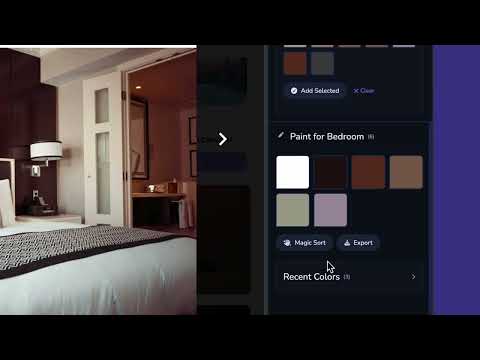
Say hello to Clip Mojo. Your new fave Color Picker + Palette Manager extension for Chrome! Grab colors from any web page in seconds. Drag a box over whatever caught your eye and Clip pulls out the dominant colors on its own. Want to be more precise? Use the eyedropper to zero in on one exact pixel, and keep clicking to grab a few more before adding them all to your palette at once. Build up your palette as you go, then copy any hex code with one click whenever you need it. Every color you grab comes with the full breakdown: hex, OKLCH, RGB, HSL, and CMYK, plus complementary and triadic harmony suggestions, so you can see what pairs well without leaving the page. New this version: turn any color, or your whole palette, into a Color Card, a branded image with the hex and OKLCH values baked right in. Download it and drop it in a moodboard, send it to a client, or post it wherever you like. Want to go deeper on accessibility? Jump out to the Mojo web app for full WCAG contrast checks, A, AA, and AAA, all in one place. There's more packed in too: Palettes now hold up to 16 colors, so there's more room to build out a full set Tap Manage to select and delete several colors at once, or add one by typing a hex code or picking it visually Blend takes every color in your palette and averages them into one new color you can preview and toss back in Your last 20 picks and clips are saved automatically, so you can always find your way back to a color Name and describe your palette, saved locally so it's there when you come back Switch between dark and light UI, whatever's easier on your eyes Magic Sort lines your palette up by hue in one tap Export as hex, CSS variables, or a JSON array, or download the whole thing as a JSON or CSV file Clip lives right in your browser sidebar, ready for the moment you spot a color and think, what is that? Find out more at SmoothMojo.com. Changes: v2.3 adds a button css fix and an displays an optional exit survey upon uninstall.
5 out of 578 ratings
Details
- Version2.3.0
- UpdatedJuly 22, 2026
- Size2.59MiB
- LanguagesEnglish (United States)
- DeveloperWebsite
Email
smoothmojoapps@gmail.com - Non-traderThis developer has not identified itself as a trader. For consumers in the European Union, please note that consumer rights do not apply to contracts between you and this developer.
Privacy

Clip Mojo: Color Picker + Palette Manager has disclosed the following information regarding the collection and usage of your data. More detailed information can be found in the developer's privacy policy.
Clip Mojo: Color Picker + Palette Manager handles the following:
This developer declares that your data is
- Not being sold to third parties, outside of the approved use cases
- Not being used or transferred for purposes that are unrelated to the item's core functionality
- Not being used or transferred to determine creditworthiness or for lending purposes