


Overview
Retroactively clip the last 15-120 seconds of web videos (YouTube, Twitch, Kick, X) with a single shortcut or click.
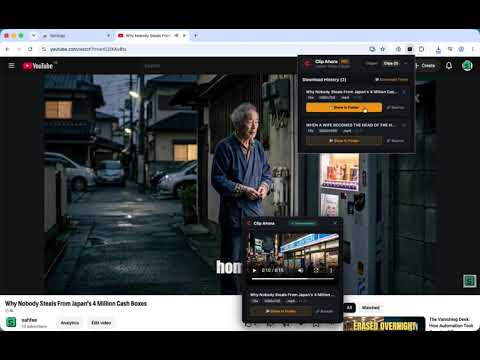
Never miss an epic gaming moment, crucial podcast quote, or hilarious video highlight again. Clip Ahora runs directly in your browser, maintaining an in-memory rolling buffer of your active video so you can retroactively save the preceding 15 to 120 seconds with a single keystroke (⌥⇧X or Alt+Shift+X) or via the toolbar action. KEY HIGHLIGHTS: • Retroactive Capture: Save what JUST happened on your screen without recording gigabytes of full-length video. • Non-Intrusive & Clean: Zero floating overlays or injected buttons touching your video player. Player controls remain completely untouched. • Universal Web Video Support: Works seamlessly across YouTube, Twitch, Kick, Twitter/X, Vimeo, and HTML5 video sites. • High Performance & Zero CPU Overhead: Uses browser-native Canvas capture and MediaRecorder only when you trigger a clip. • Instant Local Downloads: Clips are processed locally and saved directly to your Downloads folder as universally playable MP4/WebM files. • Distraction-Free Preview: Isolated preview card with one-click "Show in Finder" access to immediately share to Discord, Slack, X, or Premiere. • 100% Private & Local-First: All video processing occurs 100% locally in browser memory. Your browsing history, viewing habits, and clips are NEVER tracked, uploaded, or shared. HOW TO USE CLIP AHORA: 1. Start playing any video on YouTube or any supported video website. 2. When a highlight happens, press Alt+Shift+X (⌥⇧X on Mac) or click the Clip Ahora toolbar icon. 3. Your clip is generated instantly, saved to your Downloads folder, and displayed with a preview card to inspect or reveal the file. BUFFER PRESETS & DURATION: • Free Tier: 15-second capture at 720p with an elegant, minimal dark-glass watermark badge. • Pro Tier: Unlocks 30s, 60s, and up to 120s (2 minutes) at source resolution (1080p+) with watermark disabled. MACOS DESKTOP APP (COMING SOON): Looking for continuous desktop DVR across native games, Discord calls, and full-screen macOS windows? Clip Ahora for macOS is in active development with hotkey ⌥⌘C. Join the waitlist at https://clipahora.com. PRIVACY GUARANTEE: Clip Ahora is offline-first. We do not track you, we do not require account creation, and we never collect, transmit, or monetize your video data.
0 out of 5No ratings
Details
- Version1.0.5
- UpdatedNovember 24, 2026
- FeaturesOffers in-app purchases
- Size49.49KiB
- LanguagesEnglish
- DeveloperMAURICE NYAORO BITTAWebsite
P. O. Box 46982 Nairobi 00100 KEEmail
skoolafix@gmail.comPhone
+254 706 477677 - TraderThis developer has identified itself as a trader per the definition from the European Union and committed to only offer products or services that comply with EU laws.
Privacy

This developer declares that your data is
- Not being sold to third parties, outside of the approved use cases
- Not being used or transferred for purposes that are unrelated to the item's core functionality
- Not being used or transferred to determine creditworthiness or for lending purposes
Support
For help with questions, suggestions, or problems, please open this page on your desktop browser