

Clikr

Overview
Wireless laser pointer, clicker, and video play/pause/skip for browser slide decks. Free, with one-time-payment Pro features.
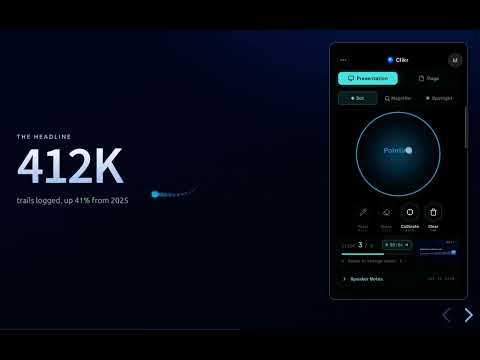
Clikr turns your phone into a wireless laser pointer, clicker, drawing tool, and presenter remote for browser-based slide decks (such as Google Slides, PowerPoint, Slides.com, Mentimeter, and Keynote). Hold your phone and point at the screen; a dot follows your motion. Swipe to switch slides. There is also some initial support for controlling (full-screen) videos, e.g. YouTube and Plex. Note: Clikr recently changed its name from Web Presenter to Clikr. How it works The Clikr extension runs in your desktop browser. The phone side is a plain web page, so there is no app to install on the phone. Pair the two with a QR code, and from then on your phone and desktop talk directly to each other. Free features (no account required) - Laser pointer dot that follows your phone's motion - Switch slides by swiping left or right - Scroll the active web page by swiping the phone screen - Reload the active page from the phone - Pointer calibration so the dot tracks accurately for your screen size and viewing distance Optional Pro features (one-time payment, no subscription) - Spotlight mode: darken everything except the area under your pointer - Magnifying glass: live zoom on a slide region without leaving fullscreen - Draw mode: annotate over your slides with pen, eraser, and clear-all - Speaker notes shown on the phone (available for Google Slides, PowerPoint, and Reveal.js decks like Slides.com) - Next-slide preview shown on the phone (available for Google Slides, PowerPoint, and Reveal.js decks like Slides.com) - Page click: tap on the phone to click links, buttons, or other interactive elements on the slide - Presentation timer on the phone - Custom pointer color - Pointer trail effect What data the extension reads and sends - Phone motion, taps, and swipes are sent from your phone directly to your desktop over a direct connection. - When a Pro user opens the speaker-notes or next-slide-preview panel on the phone, the extension reads the speaker notes and a thumbnail of the next slide from supported slide tools on the active page and sends them over the same direct connection to the paired phone. Nothing about your slides is sent to any server we run. - Page click sends a click into the active page so a tap on the phone behaves like a click on the slide. Account - No account is required to use the free features. - A sign-in is required only when you purchase Pro, so the unlock can follow you across browsers and devices. Pricing and refunds - Pro is a single one-time payment. There is no subscription and no recurring charge. - Refunds are available within the window described in the Returns policy on the homepage. Homepage and policies: https://www.clikr.app
0 out of 5No ratings
Details
- Version1.14.0.3
- UpdatedOctober 6, 2026
- FeaturesOffers in-app purchases
- Offered byMawal AB
- Size963KiB
- LanguagesEnglish (United States)
- DeveloperMawal AB
Hallandsgatan 38 Stockholm 118 57 SEEmail
mawal.webpresenter@gmail.comPhone
+46 70 412 76 57 - TraderThis developer has identified itself as a trader per the definition from the European Union and committed to only offer products or services that comply with EU laws.
- D-U-N-S350922983
Privacy

Clikr has disclosed the following information regarding the collection and usage of your data. More detailed information can be found in the developer's privacy policy.
Clikr handles the following:
This developer declares that your data is
- Not being sold to third parties, outside of the approved use cases
- Not being used or transferred for purposes that are unrelated to the item's core functionality
- Not being used or transferred to determine creditworthiness or for lending purposes