

ClientRadar — Find Clients on Facebook, Reddit, X & LinkedIn

Overview
ClientRadar watches Facebook Groups, Reddit, X and LinkedIn for people asking for what you sell, then drafts the reply on autopilot.
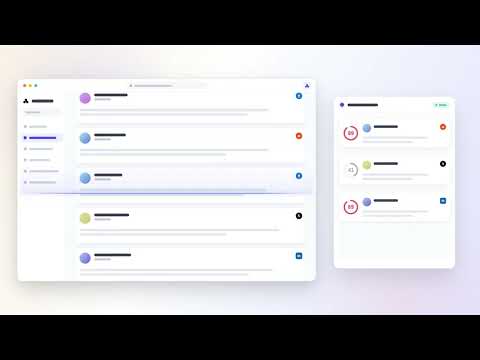
Open ClientRadar every morning and find the client conversations you'd otherwise miss. Right now, someone in a Facebook group, a subreddit, an X thread, or a LinkedIn post is asking for exactly the service you sell. They'll hire whoever shows up first with a helpful answer. ClientRadar's job is to make sure that's you. ClientRadar is an AI-powered lead-finding copilot for freelancers, consultants, and small agencies. It watches the communities and searches you choose across Facebook, Reddit, X (formerly Twitter), and LinkedIn, spots people actively looking for help, scores every conversation by buying intent, and drafts a reply in your voice — which you review and post yourself. Nothing is ever sent automatically. WHO IT'S FOR Web designers and developers, marketers and copywriters, SEO specialists, virtual assistants, video editors, photographers, coaches, consultants, bookkeepers and accountants, IT and automation service providers, boutique agencies — anyone whose next client is already asking for help somewhere on social media, and who is tired of doom-scrolling four different feeds hoping to stumble onto them. If your business grows through being genuinely helpful in communities — Facebook groups for your niche, subreddits where your customers hang out, X conversations about your specialty, LinkedIn posts in your industry — ClientRadar turns that scattered activity into one organized, scored morning routine. HOW IT WORKS 1. Tell ClientRadar what you do. A short guided onboarding builds your persona: your service, your niche, your ideal client, and the way you naturally write. 2. Point it at your hunting grounds. Choose the Facebook groups, subreddits, X searches, and LinkedIn feeds worth watching. Scanning runs inside your own browser, on your own logged-in sessions — nothing is delegated to remote bots. 3. Work only the winnable leads. Every conversation found gets an AI score for buying intent, so genuine "I need help with this, who can I hire?" posts rise straight to the top and time-wasters sink. You see why each lead scored the way it did. 4. Reply in your voice, on your terms. ClientRadar drafts a reply trained on your writing samples and your past edits. You review, tweak, and post it yourself. Draft + approve, always — the extension never posts, replies, or messages anyone on its own. WHAT YOU GET • Lead Radar — continuous scanning of your chosen communities and searches across Facebook, Reddit, X, and LinkedIn, unified into a single pipeline instead of four separate feeds • AI intent scoring — every conversation ranked by how likely it is to become paid work, so your first coffee of the day goes to the hottest lead, not the loudest thread • Reply drafting in your voice — the AI learns from your own writing samples and from every edit you make to its drafts, so suggestions sound like you, not like a template • Comment Radar — first-mover timing alerts (be the first useful answer while the post is fresh), competitor-switcher signals (catch people announcing they're leaving a tool or provider you compete with), and a live closing coach that helps you steer a warm conversation toward a call or a brief • Authority Autopilot — plans and drafts helpful, expertise-building posts for your niche communities on a schedule you control, each one matched to the tone of the community it's written for; every single post waits in a review queue for your approval before anything is published • Daily ritual — a morning flow that surfaces fresh hot leads and everything waiting for your review, with streaks and progress that turn prospecting from a chore into a habit • Value ledger — an honest, running tally of the opportunities and pipeline ClientRadar has helped you open, so you always know what it's actually worth to you • Lead pipeline — statuses, filtering, notes, and CSV/Excel export for when you want to work in a spreadsheet or import into your CRM • Multi-account aware — switch between Facebook profiles and pages without cross-contaminating your scanning identity • First-run tour — a skippable guided tour shows you around; replay it any time from any screen SAFE BY DESIGN Most "lead generation bots" get accounts restricted because they run headless scripts through shared servers, hammer platforms at machine speed, and post on your behalf. ClientRadar is built the opposite way, from the ground up: • It runs only in your browser, on your own logged-in sessions. No shared bots, no proxy farms, no password hand-over, no traffic relayed through anyone else's servers. • A built-in safety layer paces every action like a careful human: randomized delays, hard daily caps, per-platform cooldowns, duplicate protection, and one-thing-at-a-time scheduling. • If a platform starts pushing back, ClientRadar backs off automatically and pauses scanning with a cooldown rather than retrying aggressively. • It never posts, replies, DMs, follows, or reacts automatically. Every outgoing word is drafted for your review and sent by you, from your account, with your click. PRIVACY, PLAINLY • Your platform logins, cookies, and passwords never leave your browser. ClientRadar's servers have no access to your accounts and cannot act as you. • What is sent to ClientRadar's API: the text of the conversations being scored and the drafts you're working on. It's processed to score leads, draft replies, and improve your results — and used for nothing else. • Your leads live locally in your browser's storage, not in a cloud database. • No selling of data. No ad trackers. No creepy analytics. • Full privacy policy: getclientradar.com/privacy WHAT MAKES CLIENTRADAR DIFFERENT • Social listening dashboards show you mentions; ClientRadar hands you a scored, reply-ready queue with the reply already drafted in your voice. • Automation bots act as you and put your accounts at risk; ClientRadar prepares everything and lets you stay the only one who ever clicks Send. • Generic AI writing tools start from a blank page; ClientRadar starts from a real conversation with a real prospective client, found minutes after it was posted. • It covers Facebook groups, Reddit, X, and LinkedIn together — the four places small-business buyers actually ask for recommendations. FREQUENTLY ASKED QUESTIONS Is ClientRadar safe for my accounts? It's designed for exactly that. Scanning happens in your own browser with human-like pacing, strict daily caps, and automatic cooldowns — and because nothing is ever posted automatically, your accounts only ever do what you personally approve and send. Does it post or message anyone automatically? No. Never. ClientRadar drafts; you approve and post. This is a deliberate, permanent design decision, not a toggle. Do you see my passwords or log in as me? No. ClientRadar uses the sessions already logged in inside your browser. Your credentials and cookies never leave your machine, and ClientRadar's servers cannot access your accounts. Which platforms does it support? Facebook (groups and feeds), Reddit (subreddits and searches), X / Twitter (searches and conversations), and LinkedIn (feeds and posts) — all from one dashboard. Is there a free plan? Yes. Install and start today with the free tier: scored leads every day and a built-in daily AI allowance, with no account creation and no credit card. Premium plans with higher limits are rolling out. Will it work for my niche? If your clients ever ask for recommendations or complain about a problem you solve in public communities, yes. During onboarding you describe your work in your own words, and scanning plus scoring adapt to that persona — from wedding photography to Shopify development to fractional CFO work. WHY INSTALL IT TODAY Because the conversations are happening either way. Every day without a radar is a day your next client got answered by someone else. ClientRadar turns four noisy feeds into one scored queue you can clear with your morning coffee — safely, in your own voice, from your own accounts. SUPPORT Questions, feedback, feature requests: hello@getclientradar.com Guides and help center: getclientradar.com ClientRadar is an independent tool and is not affiliated with, endorsed by, or sponsored by Meta (Facebook), Reddit, X Corp, or LinkedIn/Microsoft. Platform names are used only to describe compatibility. You are responsible for complying with each platform's terms of service — and ClientRadar's draft-and-approve design exists to help you do exactly that.
5 out of 511 ratings
Details
- Version1.0.5
- UpdatedAugust 13, 2026
- Size556KiB
- LanguagesEnglish (United States)
- DeveloperGlobal Charity Solutions Kft.Website
Vajda Janos utca 25 Dunakeszi 2120 HUEmail
hello@getclientradar.comPhone
+36 30 589 1182 - TraderThis developer has identified itself as a trader per the definition from the European Union and committed to only offer products or services that comply with EU laws.
- D-U-N-S402449728
Privacy

ClientRadar — Find Clients on Facebook, Reddit, X & LinkedIn has disclosed the following information regarding the collection and usage of your data. More detailed information can be found in the developer's privacy policy.
ClientRadar — Find Clients on Facebook, Reddit, X & LinkedIn handles the following:
This developer declares that your data is
- Not being sold to third parties, outside of the approved use cases
- Not being used or transferred for purposes that are unrelated to the item's core functionality
- Not being used or transferred to determine creditworthiness or for lending purposes
Support
For help with questions, suggestions, or problems, visit the developer's support site