

Click to Call QR
1 rating
)
Overview
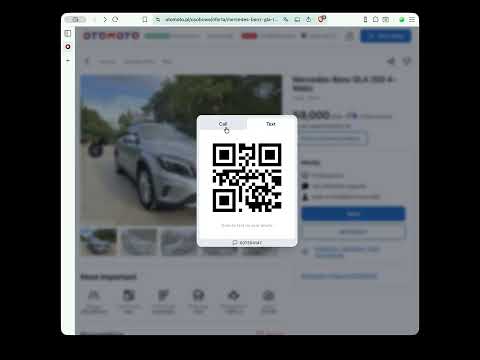
Click or select phone numbers on any website to call, text or WhatsApp via QR code.
Click to Call QR lets you call, send SMS, or open WhatsApp chats directly from your desktop browser using your phone. - Click a clickable phone number on any website - Or select a plain text number The extension instantly generates a QR code so you can continue the action on your phone. What you can do: - Call any phone number - Send an SMS - Open a WhatsApp chat - Add the number to your contacts It works across modern websites, including dynamic single-page applications (SPAs), and supports both clickable links and plain text numbers. Designed for desktop workflows: - Useful on Windows, macOS, and ChromeOS - Ideal when calling directly from desktop isn’t convenient - Quickly move phone numbers from browser to phone Key features: - Works on any website - Supports clickable and non-clickable phone numbers - Clean, minimal interface - Light and dark mode - No setup required - No accounts Privacy: All processing happens locally in your browser. No personal data is collected, stored, or transmitted.
5 out of 51 rating
Details
- Version1.2.0
- UpdatedMarch 1, 2026
- Offered byClickToCall
- Size35.46KiB
- Languages11 languages
- Developer
Email
ClickToCallQR@gmail.com - Non-traderThis developer has not identified itself as a trader. For consumers in the European Union, please note that consumer rights do not apply to contracts between you and this developer.
Privacy

This developer declares that your data is
- Not being sold to third parties, outside of the approved use cases
- Not being used or transferred for purposes that are unrelated to the item's core functionality
- Not being used or transferred to determine creditworthiness or for lending purposes