

Click Doc Builder - Screenshot & Annotation Tool

Overview
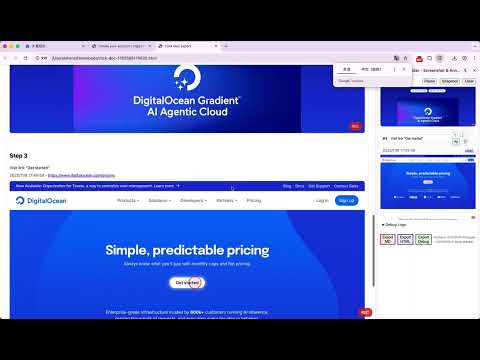
Record clicks, capture screenshots, add annotations and mosaics. Create step-by-step documentation with live sidebar preview.
📸 Click Doc Builder - Create Professional Documentation Instantly Tired of manually creating step-by-step guides? Click Doc Builder automates the entire process for you! This powerful Chrome extension captures your interactions, takes screenshots, and generates beautiful documentation in seconds. ✨ KEY FEATURES: • 📸 Automatic Screenshot Capture - Click elements and capture screenshots instantly • 🎭 Privacy Mosaic Editor - Blur sensitive information with powerful mosaic tools • 📝 Smart Element Recognition - Automatically identifies buttons, forms, and fields • 🌐 Bilingual Support - Generate descriptions in English or Chinese • 📄 Export Formats - Download as Markdown, HTML with styling • 🎨 Annotation Tools - Add text highlights and visual markers • 📱 Live Sidebar Preview - See your documentation build in real-time • 💾 Local Storage - All data stays private on your device 🛡️ PRIVACY-FIRST: • Works completely offline - no internet required • No data collection or tracking • All screenshots stored locally • Your sensitive information never leaves your browser 🎯 PERFECT FOR: • Software documentation and user guides • Training materials and tutorials • Quality assurance testing • Knowledge base creation • Process documentation • Customer support guides • Educational content creation 🚀 HOW IT WORKS: 1. Click the extension icon to start recording 2. Interact with any webpage - clicks, inputs, forms 3. Each action automatically captures a screenshot 4. Add mosaics to hide sensitive information 5. Export your documentation instantly 💡 PRO TIPS: • Use the mosaic editor to protect passwords and personal data • Toggle between English and Chinese descriptions • Export in multiple formats for different use cases • All data is stored locally for complete privacy 🔒 SECURITY & PERMISSIONS: • Minimal permissions required • Content Security Policy implemented • No external data transmission • Privacy-focused design Stop spending hours creating documentation manually. Install Click Doc Builder and create professional step-by-step guides in minutes! 🌟 Download now and transform your documentation workflow! 🌟
0 out of 5No ratings
Details
- Version1.0.0
- UpdatedNovember 13, 2025
- Offered bysongshen06
- Size31.2KiB
- Languages中文(中国)
- Developer
Email
songshen06@gmail.com - Non-traderThis developer has not identified itself as a trader. For consumers in the European Union, please note that consumer rights do not apply to contracts between you and this developer.
Privacy

This developer declares that your data is
- Not being sold to third parties, outside of the approved use cases
- Not being used or transferred for purposes that are unrelated to the item's core functionality
- Not being used or transferred to determine creditworthiness or for lending purposes