

CleeqAI: Research, Write & Create AI Podcasts

Overview
Research the web, improve your writing, and turn articles into AI podcasts with two hosts—all from your browser.
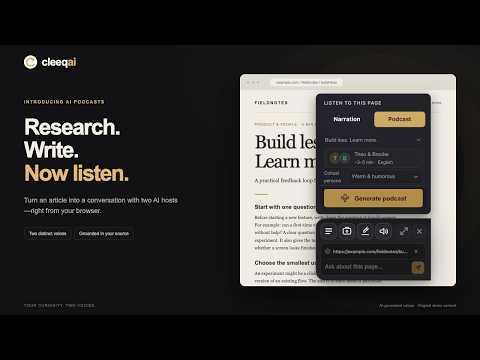
Turn what you find on the web into something you can understand, use, and listen to. CleeqAI brings AI research, writing, and audio tools into your browser. Ask questions about a page, explore a screenshot, improve your writing, or turn an article into a podcast conversation between two AI hosts. TURN ARTICLES INTO PODCASTS Go beyond a single voice reading aloud. Create a conversation that explores the ideas in your selected content. • Choose two host voices and a short episode or deeper discussion. • Set the cohost’s personality: Default, Warm & Humorous, or Critique. • Add a topic or question you want the conversation to focus on. • Follow chapters, adjust playback speed, and read the transcript and source excerpts. • Share completed podcasts with a public listening link that anyone can open. READ AND RESEARCH Summarize pages, explain unfamiliar concepts, and ask follow-up questions about what you’re reading. Use AI-powered web search to explore topics, or capture a screenshot to discuss what’s on your screen. WRITE AND CREATE Rewrite, proofread, translate, and adjust the tone of your text. Develop articles, draft posts for X, and turn your research into clear, useful writing. LISTEN YOUR WAY Choose Narration to hear page content read aloud, or Podcast for a conversation between two hosts. Keep your saved audio together for easy replay. START FREE Create a CleeqAI account to generate podcasts. Free and paid plans are available, with daily usage limits and higher allowances on paid plans.
5 out of 58 ratings
Details
- Version0.6.1
- UpdatedOctober 26, 2026
- Size8.49MiB
- LanguagesEnglish
- DeveloperWebsite
Email
support@cleeqai.co - Non-traderThis developer has not identified itself as a trader. For consumers in the European Union, please note that consumer rights do not apply to contracts between you and this developer.
Privacy

CleeqAI: Research, Write & Create AI Podcasts has disclosed the following information regarding the collection and usage of your data. More detailed information can be found in the developer's privacy policy.
CleeqAI: Research, Write & Create AI Podcasts handles the following:
This developer declares that your data is
- Not being sold to third parties, outside of the approved use cases
- Not being used or transferred for purposes that are unrelated to the item's core functionality
- Not being used or transferred to determine creditworthiness or for lending purposes
Support
For help with questions, suggestions, or problems, visit the developer's support site