


Overview
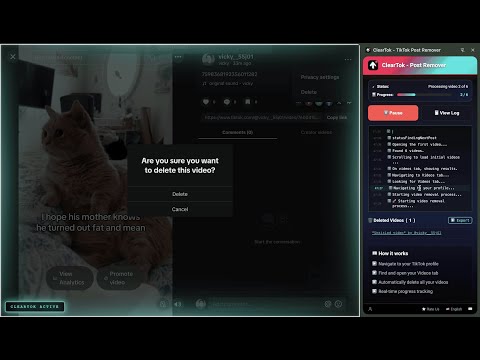
Instantly delete all your TikTok videos—no scrolling, no tapping.
ClearTok – TikTok Post Remover helps you delete your own TikTok posts quickly and effortlessly. If you have too many old or unwanted TikTok posts, ClearTok lets you remove them in bulk — no manual scrolling, no repetitive tapping. Key features: • Delete your own TikTok posts in bulk • Works directly on TikTok.com • No password required • No account data collected • Runs locally in your browser How it works: 1. Install the extension 2. Open TikTok and go to your profile 3. Start the remover 4. Your posts will be deleted automatically Privacy & Safety: ClearTok does NOT collect, store, or transmit your TikTok login information. All actions are performed locally in your browser, just like manual clicks — only faster. Note: This extension can only delete posts from your own TikTok account. It cannot delete content from other users. ClearTok is an independent tool and is not affiliated with or endorsed by TikTok.
4.2 out of 55 ratings
Details
- Version1.0.2
- UpdatedJune 16, 2026
- Size176KiB
- Languages17 languages
- Developer
- Non-traderThis developer has not identified itself as a trader. For consumers in the European Union, please note that consumer rights do not apply to contracts between you and this developer.
Privacy

This developer declares that your data is
- Not being sold to third parties, outside of the approved use cases
- Not being used or transferred for purposes that are unrelated to the item's core functionality
- Not being used or transferred to determine creditworthiness or for lending purposes
Support
For help with questions, suggestions, or problems, visit the developer's support site