


總覽
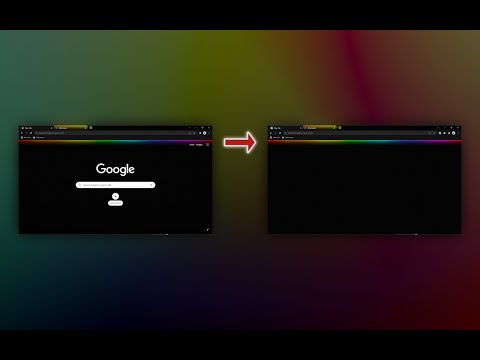
Remove everything from the new tab page while keeping your theme background, or use any image, GIF, or video as a custom wallpaper.
Want a blank new tab and nothing more? Try this extension: https://chromewebstore.google.com/detail/odjfoclbnmllekbhpbgopiiaelcpeimb 🌄 Theme background When Clear New Tab is installed and "Theme background" mode is selected, the backgrounds of themes you install from the Chrome Web Store will automatically download and appear in the new tab. If the theme background appears too large or small, you can fix it by setting "Background size" to "Cover the screen." 🖼️ Your own background Upload your own background (image, GIF, or video) or choose a custom color to display in the new tab page. 🔁 Cycle through different backgrounds Clear New Tab can cycle through your backgrounds, showing a different one each time you open a new tab. 🎨 Random solid color Display a randomly generated solid color background each time you open a new tab. 📅 Schedule a background In "Scheduled" mode, Clear New Tab lets you display specific backgrounds at the dates and times you choose. ---------------------------------------------------------------- ❓ FAQ There's no search bar. How do I search the web? Use the address bar for web searches. The bookmarks bar doesn't show in the new tab. Why does Clear New Tab hide it? Clear New Tab doesn't hide it; if an extension replaces the default new tab, Chrome automatically hides the bookmarks bar. To make it always visible, press Ctrl + Shift + B. How can I eliminate the "white flash" before a background loads? Adjust the "Color of the area around the background" setting. Ensure that "Settings context" is set to "Global." The theme background doesn't fit the screen. How do I fix it? Select "Cover the screen" or "Fit to the browser window" in the "Background size" dropdown. Custom HTML links aren't working. How do I fix them? Add target="_top" to the <a> tag. Example: <a href="https://www.microsoft.com" target="_top">Microsoft</a> ---------------------------------------------------------------- 🛠️ Known Issues Clear New Tab data may be automatically removed by the browser. The extension uses IndexedDB to store user data, which the browser may delete if it detects insufficient free space. ---------------------------------------------------------------- 🔐 Permissions Replace the page you see when opening a new tab Allows the extension to display a background image on the new tab page. Read and change your data on clients2.google.com and clients2.googleusercontent.com Allows the extension to download a theme CRX package containing the theme background and other data, such as background-repeat and color of the area around the background. Manage your apps, extensions, and themes Allows the extension to detect when a theme is installed and provides information about the installed theme (e.g., theme ID, theme name). The theme ID is used to download the CRX package. 🔓 Optional Permissions Read data you copy and paste Allows the extension to paste an image or image link in the "Paste image or its link" input using the "Paste" button. ---------------------------------------------------------------- 🐱 GitHub: https://github.com/loftyshaky/clear-new-tab 🧩 Follow my Facebook page (more extensions): https://www.facebook.com/browservery ---------------------------------------------------------------- Ads When using Clear New Tab, you may encounter affiliate links on the extension's settings page.
4.6 分 (滿分 5 分)320 個評分
詳細資料
- 版本6.11.0
- 已更新2025年12月17日
- 提供者https://www.facebook.com/browservery
- 大小2.29MiB
- 語言51 種語言
- 開發人員
電子郵件
loftyshaky@gmail.com - 非交易商這位開發人員並未表明自己是交易商。歐盟地區的消費者請注意,消費者權利不適用於你和這位開發人員之間簽訂的合約。
隱私權

這位開發者就你的資料做出下列聲明:
- 除經核准的用途外,不會將你的資料販售給第三方
- 不會基於與商品核心功能無關的目的,使用或轉移資料
- 不會為了確認信用度或基於貸款目的,使用或轉移資料
支援
如有疑問或建議,請前往開發人員的支援網站