

CleanPrint PDF: Clutter-Free Reader & Click-to-Remove Print Studio

Overview
Strip clutter, click to remove anything, fix typography and print or save any page as a crisp PDF. 100% local, zero tracking.
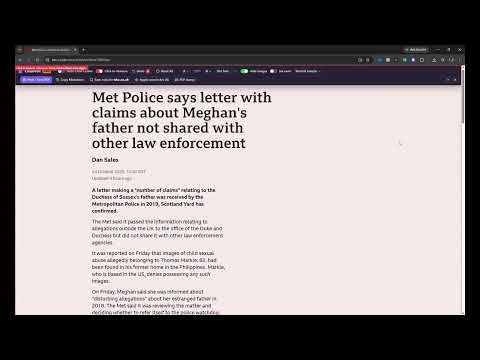
Print the page, not the clutter. CleanPrint PDF turns any article, invoice, recipe, ticket, court filing or journal page into a clean, readable document in seconds — then prints it or saves it as a crisp PDF. No ads, no account, no tracking, no cloud. Everything runs inside your browser. Click the toolbar icon (or press Alt+P) and a floating Studio toolbar appears on the page: ✔ AUTO-CLEAN CLUTTER — one toggle hides navigation bars, headers, footers, sidebars, ads, cookie banners, pop-ups, newsletter boxes, share bars, comment sections and sticky overlays, then centres the main content at a comfortable reading width. Fully reversible. ✔ CLICK-TO-REMOVE — hover any element to see a red outline and a tag such as "Click to remove <div.sidebar>", then click to hide it. Undo with Ctrl+Z (with a counter badge) or Reset All. ✔ TYPOGRAPHY & LAYOUT — text size from 85 % to 150 %, sans-serif / serif / monospace fonts, hide all images with one click, an ink-saver mode (pure black on white, no backgrounds) and narrow / normal / wide print margins. ✔ PRINT / SAVE AS PDF — a tuned print stylesheet keeps images, tables, code blocks and list items from being sliced across pages, keeps headings with their content and removes ugly link URL annotations. Then it opens Chrome's print dialog so you can print or "Save as PDF". CLEANPRINT PRO (£9.99 lifetime or £1.99 / month) ★ Saved website rules — remember the elements you removed and the typography you chose for a site, and re-apply them in one click or automatically. Perfect for recurring invoices, Jira tickets, recipe sites and journals. ★ Custom PDF header / footer stamp — e.g. "Prepared by Acme Legal — Confidential" or "Client copy — Invoice archive" on every printed page. ★ Copy as clean Markdown — headings, lists, tables, links and code from the cleaned page straight to your clipboard. The free plan includes 3 free uses each of Saved rules and Copy Markdown so you can try them first. PRIVACY FIRST • Nothing you read is ever sent anywhere. CleanPrint makes no network requests except a single license check with Lemon Squeezy when you enter a Pro key. • It only touches a page after you open the Studio on that tab, and it restores the page the moment you close it. • Minimal permissions: activeTab, scripting and storage. No access to all websites, no browsing history. WHO IT IS FOR Lawyers and paralegals printing filings, accountants archiving invoices, developers printing documentation, home cooks who want recipes without the life story, students and researchers saving articles for offline reading, and anyone tired of extensions full of ads and trackers. Keyboard: Alt+P opens or closes the Studio · Ctrl+Z undoes a removal · Esc leaves Click-to-Remove mode.
0 out of 5No ratings
Details
- Version1.0.0
- UpdatedOctober 26, 2026
- FeaturesOffers in-app purchases
- Offered byLean Strategy Guru
- Size40.39KiB
- LanguagesEnglish (United Kingdom)
- DeveloperPaul Massey
Vicarage Farm, Underlane Helston TR13 0EJ GBEmail
gbp-spy@leanstrategy.guruPhone
+44 7966 474686 - TraderThis developer has identified itself as a trader per the definition from the European Union and committed to only offer products or services that comply with EU laws.
Privacy

This developer declares that your data is
- Not being sold to third parties, outside of the approved use cases
- Not being used or transferred for purposes that are unrelated to the item's core functionality
- Not being used or transferred to determine creditworthiness or for lending purposes
Support
For help with questions, suggestions, or problems, please open this page on your desktop browser