

Clean YouTube
1 rating
)
Overview
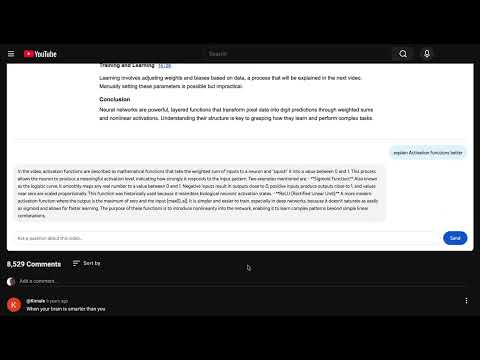
Hide Shorts, recommendations, comments, and other distractions. Summarize videos and ask questions with AI.
Make YouTube quieter. Clean YouTube lets you choose which parts of YouTube you want to see. Hide the features that pull your attention away, then bring them back whenever you need them. Free controls: • Hide Shorts • Hide sidebar recommendations • Hide the home feed • Hide comments • Hide notifications • Hide the left menu • Turn every distraction control on or off at once Clean YouTube Premium also helps you understand a video before you commit your time: • Generate a structured summary with key points and clickable timestamps • Ask questions about the video and get answers based on its transcript Your distraction settings stay on your device. The free controls do not require an account. Premium is a one-time purchase activated with a license key. **Clean YouTube is an independent extension and is not affiliated with or endorsed by YouTube or Google.**
5 out of 51 rating
Details
- Version1.4.0
- UpdatedSeptember 24, 2026
- FeaturesOffers in-app purchases
- Offered byThiago Barreto
- Size288KiB
- LanguagesEnglish
- Developer
Email
admin@plusultraconsulting.com - Non-traderThis developer has not identified itself as a trader. For consumers in the European Union, please note that consumer rights do not apply to contracts between you and this developer.
Privacy

This developer declares that your data is
- Not being sold to third parties, outside of the approved use cases
- Not being used or transferred for purposes that are unrelated to the item's core functionality
- Not being used or transferred to determine creditworthiness or for lending purposes
Support
For help with questions, suggestions, or problems, visit the developer's support site