


概述
Clean up some annoying elements on Twitter and make your Twitter experience cleaner
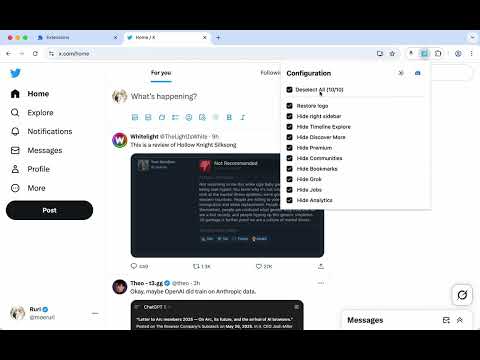
Clean up unnecessary elements on X (Twitter) and enjoy a cleaner, more focused browsing experience. ✨ FEATURES Core Features: • Restore classic Twitter logo - Bring back the beloved bird logo • Hide right sidebar - Remove trending topics and suggestions for a distraction-free interface Navigation Cleanup: • Hide Timeline Explore - Remove the Explore tab from your timeline • Hide Discover More - Remove "Discover more" recommendations • Hide Premium - Remove X Premium/Twitter Blue promotional elements • Hide Communities - Remove the Communities tab from navigation • Hide Bookmarks - Remove the Bookmarks tab for a simpler menu • Hide Grok - Remove the Grok AI assistant • Hide Jobs - Remove the Jobs section • Hide Analytics - Remove the Analytics tab • Hide Today News • Hide Who to Follow • Hide Advertisement • Hide Lists • Hide Spaces 🚀 GETTING STARTED 1. Install the extension from Chrome Web Store 2. Visit X (Twitter) - The extension activates automatically 3. Click the extension icon in your toolbar to customize which features to enable or disable 4. Your preferences are saved automatically and sync across devices ⚙️ CUSTOMIZATION All features can be individually toggled on/off through the extension popup. Choose exactly what you want to see and hide everything else. 💬 SUPPORT & COMMUNITY Join our Discord community for support, feature requests, and discussions: https://discord.gg/gFhKUthc88 Make X (Twitter) yours again - Install Clean Twitter today!
5 星(5 星制)4 个评分
详情
隐私权
该开发者已声明,您的数据:
- 不会因未获批准的用途出售给第三方
- 不会为实现与产品核心功能无关的目的而使用或转移
- 不会为确定信用度或放贷目的而使用或转移
支持
若有任何疑问、建议或问题,请在桌面浏览器中打开此页面