


概述
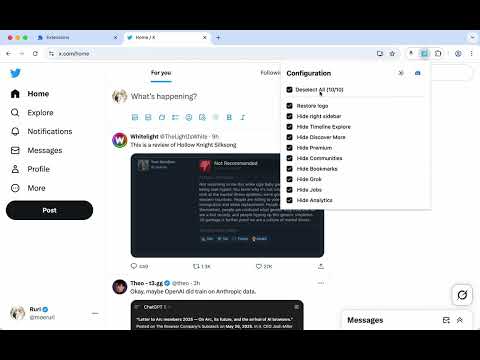
Clean up some annoying elements on Twitter and make your Twitter experience cleaner
Clean up unnecessary elements on X (Twitter) and enjoy a cleaner, more focused browsing experience. FEATURES Branding: • Restore classic Twitter logo - Bring back the bird logo Layout: • Hide right sidebar - Remove trending topics and suggestions Left Navigation: • Hide Chat - Remove the Chat/Messages tab • Hide Grok - Remove the Grok AI assistant • Hide Lists - Remove the Lists tab • Hide Bookmarks - Remove the Bookmarks tab • Hide Communities - Remove the Communities tab • Hide Premium - Remove X Premium/Twitter Blue promotional elements • Hide Profile - Remove the Profile navigation link • Hide Creator Studio • Hide Ads - Remove promotional advertisements from navigation • Hide Create your Space • Hide More - Remove the More menu option • Hide Follow - Remove the Follow navigation • Hide Aritcles - Remove the Aritcles navigation • Hide App Download in iOS Tweet Actions: • Hide Analytics - Remove analytics buttons from tweets • Hide Bookmarks - Remove bookmark buttons from tweet actions • Hide Grok - Remove the Grok AI assistant Content Area: • Hide Timeline Explore - Remove the Explore tab from your timeline • Hide Discover More - Remove "Discover more" recommendations • Hide Advertisement - Remove sponsored content and ads from your feed • Hide Today News - Remove "Today" news section • Hide Who to Follow - Remove "Who to follow" suggestions • Text mode in Home - Remove Image and Video in Home • Hide Space Live - Remove live notification in Home • Hide Notification Recommendation - Remove recommended posts from notifications GETTING STARTED 1. Install the extension from Chrome Web Store 2. Visit X (Twitter) - The extension activates automatically 3. Click the extension icon in your toolbar to customize which features to enable or disable 4. Your preferences are saved automatically and sync across devices CUSTOMIZATION All features can be individually toggled on/off through the extension popup. Choose exactly what you want to see and hide everything else. OTHER EXTENSIONS The extension popup also includes links to our other browser extensions for your reference. SUPPORT Join our Discord community for support, feature requests, and discussions: https://discord.gg/gFhKUthc88 Make X (Twitter) yours again - Install Clean Twitter today!
5 星(5 星制)7 个评分
详情
隐私权

该开发者已声明,您的数据:
- 不会因未获批准的用途出售给第三方
- 不会为实现与产品核心功能无关的目的而使用或转移
- 不会为确定信用度或放贷目的而使用或转移
支持
若有任何疑问、建议或问题,请在桌面浏览器中打开此页面