

Clean before AI — hide personal data before you chat with AI

Overview
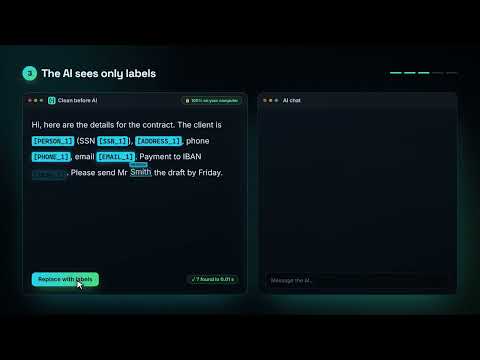
Hides names, IDs, IBANs and addresses before they reach the AI — then shows the answer with your real data. 100% local.
``` Clean before AI hides personal and confidential data before it reaches an AI chat — and shows you the answer with your real data. Everything runs 100% on your computer. HOW IT WORKS 1. Paste as usual — an email, a contract, a medical report or a CV. If the text contains personal data, a small window appears before the AI site sees anything. 2. One click replaces names, ID numbers, bank accounts, card numbers, addresses, phone numbers, emails and company names with labels such as [PERSON_1]. A short note asks the AI to keep the labels. 3. The AI answers with labels. The side panel opens by itself and shows the answer with your real data, ready to copy. YOUR DATA NEVER LEAVES YOUR COMPUTER • No server, no account, no tracking, no analytics. • The key that links labels to real values lives only in your browser's session memory and is deleted when you close the browser. • Real data is shown only in the extension's own side panel and is never written into the AI website. MADE FOR EUROPEAN LANGUAGES Clean before AI understands seventeen European languages, among them Slovenian, Polish and German, and its English covers both the United Kingdom and the United States. It recognises national and tax ID numbers from these countries and checks them with their official checksums. It also understands grammatical cases, including Polish and Czech ones, so "Janezu Novaku" is recognised as the same person as "Janez Novak". It detects the language of the text paragraph by paragraph and, by default, writes the labels in the same language. ALSO FOR WORK DATA It also hides passwords, API keys and access tokens pasted from logs or config files, internal server names and user accounts, patient and record numbers, court case and claim numbers, and participant IDs in tables copied from Excel. SMART DETECTION — A LOCAL AI MODEL Besides the rules, a small AI model built into the extension finds names, nicknames and addresses that no dictionary knows. It runs on your computer, works offline and sends nothing anywhere. Doubtful words are shown in a "Check" row — one click keeps a word in the text if it isn't personal data. YOUR KNOWN NAMES Add colleagues, clients or project names in the side panel, or import them from a CSV file. They are always hidden, in every form, in capitals and without accents. Organisations can set the list for all employees through a Chrome policy. REVIEW BEFORE PASTING When you paste, the side panel shows the whole text with the detected data highlighted. Click a highlight to keep it, or select anything that was missed and click "Hide" — so you see exactly what the AI will receive. WHERE IT WORKS On popular AI chat sites such as ChatGPT, Claude and Gemini. A round button in the bottom-right corner opens and closes the side panel. The interface is available in fourteen languages. Free, no account. To clean PDFs and scans, or to download a redacted PDF, use the free web tool at hypervision.si. Please note: numbers with checksums are detected very reliably, but unusual names or indirect clues can slip through — take a quick look before sending. © 2026 David Radovič · https://hypervision.si/en/terms/ ```
0 out of 5No ratings
Details
- Version1.4.0
- UpdatedOctober 6, 2026
- Size38.52MiB
- Languages16 languages
- DeveloperWebsite
Email
hello@hypervision.si - Non-traderThis developer has not identified itself as a trader. For consumers in the European Union, please note that consumer rights do not apply to contracts between you and this developer.
Privacy

Clean before AI — hide personal data before you chat with AI has disclosed the following information regarding the collection and usage of your data. More detailed information can be found in the developer's privacy policy.
Clean before AI — hide personal data before you chat with AI handles the following:
This developer declares that your data is
- Not being sold to third parties, outside of the approved use cases
- Not being used or transferred for purposes that are unrelated to the item's core functionality
- Not being used or transferred to determine creditworthiness or for lending purposes
Support
For help with questions, suggestions, or problems, visit the developer's support site