

Claude Limit & Usage Tracker + Fable 5 - ClaudeKarma

Overview
Track your Claude AI usage limits at a glance: Fable 5, session and weekly limits with a beautiful toolbar icon.
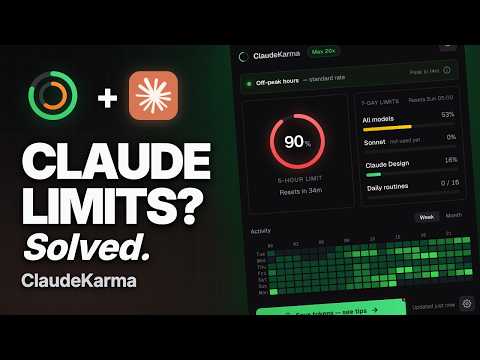
Track your Claude usage, your Fable 5 weekly limit and your Claude limits the moment they change. ClaudeKarma is the Chrome extension every Claude AI user should pin. It puts your Fable 5 limit, your 5-hour session limit, your 7-day weekly cap, your per-model usage, your Extra Usage credits and Anthropic's peak hours one click away from any tab. Stop guessing how many hours of Claude you have left. Stop hitting "you have reached your limit" mid-prompt. Free, local-first, privacy-respecting. Works with Claude Pro, Claude Max 5x, Claude Max 20x, Team and Enterprise. FABLE 5 TRACKING (NEW IN 1.4.0) Anthropic's new flagship model gets its own dedicated bar. Claude reports Fable 5 usage as a separate weekly limit, and ClaudeKarma shows it as a highlighted neon bar at the top of your 7-day limits, so you always know how much Fable 5 you have left this week. No setup: if your plan has Fable 5, the bar appears automatically. EXTRA USAGE CREDITS (NEW IN 1.4.0) With Anthropic moving more usage to credits, ClaudeKarma now tracks your Extra Usage in real money: monthly spend, remaining prepaid balance and your credit cap, right in the popup. Know exactly where you stand before you buy more. PEAK HOURS Peak hours drain your Claude session 3 to 5x faster (weekdays 5 to 11 AM Pacific Time, per Anthropic's official schedule). ClaudeKarma shows a live peak/off-peak banner with a countdown to the next change, so you can shift your heavy work to off-peak windows. The schedule is fetched from a public configuration file and updates automatically when Anthropic adjusts it. No extension update required. For Pro and Max plans, the banner correctly reflects Anthropic's May 2026 change: peak hours no longer impact Claude Code on those plans, only chat sessions. LIVE USAGE TRACKING Live Session Gauge: a circular gauge with the percentage of your 5-hour Claude limit used, color-coded green to red as you approach the cap. Per-Model Breakdown: track All models, Fable 5, Opus, Sonnet, Haiku and Claude Design as stacked bars on your weekly cap. Daily Routines Tracker: monitor your scheduled Claude Code routines (Max plans, X / 15 per day). Plan Badge: see your tier at a glance (Pro, Max 5x, Max 20x, Team, Enterprise). CLAUDE HOURS HEATMAP A GitHub-style hourly grid that shows when you actually use Claude across the week or the month. Spot your patterns. Plan around peak. Work smarter. KARMA LEVELS A small progress system that tracks your milestones from your first install to surviving a 90% session usage spike. Six levels: Tracker, Daily, Power, Halfway, Marathoner, Foresight. A subtle star badge in the popup header, with a popover explaining where you are and what unlocks next. Toggle off in settings if you prefer it hidden. CLAUDE LIMITS MONITORING The toolbar icon shows two concentric rings: - Outer ring: 5-hour session limit - Inner ring: 7-day weekly limit (all models) Colors shift from green to yellow to orange to red as you approach your Claude limits. At 90% and above the icon blinks to grab your attention before you hit the wall. Smart browser notifications fire at 75%, 90% and 100% (configurable, all off by default if you prefer no interruptions). LIGHT AND DARK MODE The popup, tips page and update page fully support light mode. A toggle in the header cycles between auto (follows your OS setting), light and dark. Your preference is saved and applied instantly with no flash on open. PRIVACY FIRST ClaudeKarma keeps your data on your device. Your usage history, your settings, your Karma progress all live in your browser, in chrome.storage.local. The extension makes only three outbound network calls during normal use: one to Claude.ai to read your own usage and credits data (using your existing session, no password ever stored), one to a public peak hours configuration file on tokenkarma.app (no auth, no cookies, same response for every user), and one anonymous daily heartbeat that tells us an install is alive (extension version and install age only, no account, no usage data, no identifier). No analytics, no third-party tracking SDKs, no fingerprinting inside the extension. When you uninstall, Chrome opens a short feedback page on tokenkarma.app where the extension version, your browser language, your operating system and a handful of anonymous health counters (whether the extension could read your usage, and which errors it hit) are passed as plain query parameters, so we can tell why it did not work for you. You can close the tab without answering. Full transparency on this and everything else: https://tokenkarma.app/claudekarma/privacy WHAT IS NEW IN V1.4.0 - NEW: Fable 5 tracking, a dedicated highlighted bar for Anthropic's new flagship model in your 7-day limits - NEW: Extra Usage credits tracker, monthly spend and remaining prepaid balance right in the popup - Refreshed extension name so Fable 5 users can find it in search - Anonymous reliability signals (daily heartbeat and uninstall health counters) so we can fix breakage faster; no usage data, no identifiers - Popup polish: pinned footer, capped height, single top banner slot WHAT IS NEW IN V1.3.2 - NEW: Light mode with auto, light and dark options, follows your OS by default - NEW: Theme toggle in the popup header, preference saved across sessions - Improved contrast on small text in both dark and light modes for better readability - Fixed usage bar tracks and gauge ring invisible on light backgrounds REQUIREMENTS - An active Claude AI account on claude.ai - You must be logged into Claude in your browser ABOUT TOKENKARMA ClaudeKarma is the first product in the TokenKarma family. More AI usage trackers are on the way for ChatGPT, Grok, Gemini, Cursor and Perplexity, with cloud sync planned for the long-term roadmap. Free, simple educational tips at tokenkarma.app/tips. Independent project. Not affiliated with Anthropic. Privacy policy: https://tokenkarma.app/claudekarma/privacy Tips: https://tokenkarma.app/tips Made by Jean-Rémi Larcelet-Prost.
4.8 out of 5123 ratings
Details
- Version1.5.3
- UpdatedSeptember 24, 2026
- Size267KiB
- Languages9 languages
- DeveloperWebsite
Email
tabkarma@duck.com - Non-traderThis developer has not identified itself as a trader. For consumers in the European Union, please note that consumer rights do not apply to contracts between you and this developer.
Privacy

Claude Limit & Usage Tracker + Fable 5 - ClaudeKarma has disclosed the following information regarding the collection and usage of your data. More detailed information can be found in the developer's privacy policy.
Claude Limit & Usage Tracker + Fable 5 - ClaudeKarma handles the following:
This developer declares that your data is
- Not being sold to third parties, outside of the approved use cases
- Not being used or transferred for purposes that are unrelated to the item's core functionality
- Not being used or transferred to determine creditworthiness or for lending purposes