


總覽
Claude in Chrome
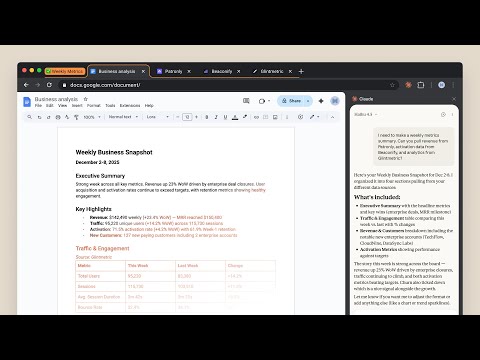
Claude in Chrome A lot of work lives behind a login, on a page with no export button. Claude in Chrome works there. Open the side panel and describe what you're trying to do: Claude reads the page, clicks, types, navigates, and fills forms, while you watch and decide what happens next. Available on all paid plans. WHAT'S NEW The side panel is now Claude Cowork. Same Claude you use on desktop, web, and mobile, in the tab you're already looking at. - Saved sessions: every side panel conversation is kept, so you can come back to it. - Pick up anywhere: start a task in the browser, finish it wherever you keep your files. - Your skills and connectors: the skills, plugins, and connectors you use in Cowork work in the side panel too. - Available on Max and Team. Rolling out to Pro in the coming weeks. Available to Enterprise if enabled by administrator. Also recently: - Scheduled tasks: set recurring browser work that runs on your schedule. - Multi-tab workflows: drag tabs into the Claude tab group and Claude works across all of them. - Console logs: Claude reads errors, network requests, and DOM state while you debug. WHERE YOU WORK FROM This extension is what lets Claude see and act in your browser. Direct that work from wherever you already are: - The side panel, when you're on the page. Nothing else needs to be open. - Claude Cowork for Mac or Windows, when the browser is one step in a job that also touches your files and other tools on your computer. Keep the desktop app running and Claude works in Chrome from there. - Claude Code, when you're building the site you're testing. WHAT PEOPLE USE IT FOR Six invoices, six vendor portals, none of which talk to anything. Claude pulls the numbers into a spreadsheet, and you decide what they mean. - Pull your information out of pages that have no export button. - Fill the forms and do the data entry you've been putting off. - Follow a process across a dozen tabs without losing your place. - Work through your inbox and calendar. - Gather what you need in the browser, then think it through in Claude Cowork. You watch it happen, and you step in whenever you want to. FOR DEVELOPERS Claude Code and the Chrome extension give you a build-test-fix loop: - Design verification: take a design mock, build with Claude Code, check accuracy in the browser. - Live debugging: Claude reads console errors and DOM state, then proposes a fix. - Automated testing: schedule Claude to check your site daily and catch regressions. YOU'RE IN CONTROL Websites can hide instructions that try to redirect Claude's actions. Claude can ask before it acts, one site at a time, and can't reach anything you haven't approved. Or turn on "automatically approve": Claude keeps working while a separate safety check reviews each consequential action first and blocks anything that looks wrong. We build defenses against this and test them, and we still recommend starting on sites you know, reading the prompts when they come, and telling us if Claude does something you didn't ask for. On Team and Enterprise plans, admins enable or disable the extension org-wide and set which sites are allowed. Full safety guide: https://support.claude.com/en/articles/12902428 GETTING STARTED 1. Subscribe to any paid plan 2. Install this extension 3. Sign in with your Claude credentials 4. Open the side panel and describe what you're working on 5. Grant permissions when prompted Note: Claude in Chrome is not supported on other Chromium-based browsers or on mobile devices. Terms of Service: https://www.anthropic.com/legal/consumer-terms, https://www.anthropic.com/legal/commercial-terms Privacy Policy: https://www.anthropic.com/legal/privacy
2.8 分 (滿分 5 分)1632 個評分
詳細資料
隱私權

「Claude」已揭露下列關於收集及使用資料的資訊。 如需更多詳細資訊,請參閱開發人員的《privacy policy》。
Claude 會處理下列資料:
這位開發者就你的資料做出下列聲明:
- 除經核准的用途外,不會將你的資料販售給第三方
- 不會基於與商品核心功能無關的目的,使用或轉移資料
- 不會為了確認信用度或基於貸款目的,使用或轉移資料
支援
如有疑問或建議,請使用電腦版瀏覽器開啟這個頁面