


Tổng quan
Claude in Chrome
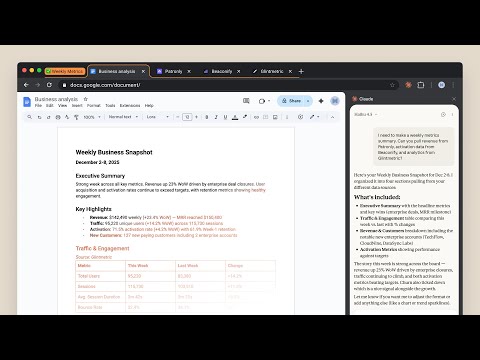
Claude in Chrome A lot of work lives behind a login, on a page with no export button. Claude in Chrome works there. Open the side panel and describe what you're trying to do: Claude reads the page, clicks, types, navigates, and fills forms, while you watch and decide what happens next. Available on all paid plans. WHAT'S NEW The side panel is now the same Claude you use on desktop, web, and mobile, in the tab you're already looking at. - Saved sessions: every side panel conversation is kept, so you can come back to it - Pick up anywhere: start a task in the browser, finish it wherever you keep your files - Your skills and connectors: the skills, plugins, and connectors you use in Claude work in the side panel too - Available on all paid plans. On Enterprise, your admin controls access. Also recently: - Scheduled tasks: set recurring browser work that runs on your schedule - Multi-tab workflows: drag tabs into the Claude tab group and Claude works across all of them - Console logs: Claude reads errors, network requests, and DOM state while you debug WHERE YOU WORK FROM This extension is what lets Claude see and act in your browser. Direct that work from wherever you already are: - The side panel, when you're on the page. Nothing else needs to be open. - The Claude desktop app for Mac or Windows, when the browser is one step in a job that also touches your files and other tools on your computer. Keep the desktop app running and Claude works in Chrome from there. - Claude Code, when you're building the site you're testing. WHAT PEOPLE USE IT FOR Six invoices, six vendor portals, none of which talk to anything. Claude pulls the numbers into a spreadsheet, and you decide what they mean. - Pull your information out of pages that have no export button - Fill the forms and do the data entry you've been putting off - Follow a process across a dozen tabs without losing your place - Work through your inbox and calendar - Gather what you need in the browser, then think it through in Claude on desktop, web, or mobile You watch it happen, and you step in whenever you want to. FOR DEVELOPERS Claude Code and the Chrome extension give you a build-test-fix loop: - Design verification: take a design mock, build with Claude Code, check accuracy in the browser - Live debugging: Claude reads console errors and DOM state, then proposes a fix - Automated testing: schedule Claude to check your site daily and catch regressions YOU'RE IN CONTROL Websites can hide instructions that try to redirect Claude's actions. Claude can ask before it acts, one site at a time, and can't reach anything you haven't approved. Or turn on “automatically approve”: Claude keeps working while a separate safety check reviews each consequential action first and blocks anything that looks wrong. We build defenses against this and test them, and we still recommend starting on sites you know, reading the prompts when they come, and telling us if Claude does something you didn't ask for. On Team and Enterprise plans, admins enable or disable the extension org-wide and set which sites are allowed. Full safety guide: https://support.claude.com/en/articles/12902428 GETTING STARTED 1. Subscribe to any paid plan 2. Install this extension 3. Sign in with your Claude credentials 4. Open the side panel and describe what you're working on 5. Grant permissions when prompted Note: Claude in Chrome is not supported on other Chromium-based browsers or on mobile devices. Terms of Service: https://www.anthropic.com/legal/consumer-terms, https://www.anthropic.com/legal/commercial-terms Privacy Policy: https://www.anthropic.com/legal/privacy
3,6/51,9 N lượt xếp hạng
Chi tiết
- Phiên bản1.0.102
- Đã cập nhật21 tháng 10, 2026
- Kích thước6.64MiB
- Ngôn ngữEnglish (United States)
- Nhà phát triểnAnthropicTrang web
548 Market St PMB 90375 San Francisco, CA 94104-5401 USEmail
chrome-developer@anthropic.com - Người bán phi thương mạiNhà phát triển này không tự nhận mình là người bán. Đối với người tiêu dùng ở Liên minh Châu Âu, xin lưu ý rằng các quyền của người tiêu dùng không được áp dụng trong hợp đồng giữa bạn và nhà phát triển này.
Quyền riêng tư

Claude đã công bố thông tin sau đây liên quan đến việc thu thập và sử dụng dữ liệu của bạn. Bạn có thể xem thêm thông tin chi tiết trong privacy policy của nhà phát triển.
Claude xử lý dữ liệu sau:
Nhà phát triển này tuyên bố rằng dữ liệu của bạn
- Không được bán cho bên thứ ba, ngoài những trường hợp sử dụng đã được phê duyệt
- Không được sử dụng hoặc chuyển nhượng cho các mục đích không liên quan đến chức năng chính của mặt hàng
- Không được sử dụng hoặc chuyển nhượng để xác định khả năng thanh toán nợ hoặc phục vụ mục đích cho vay
Hỗ trợ
Nếu bạn có câu hỏi, ý kiến đề xuất hoặc gặp vấn đề, vui lòng mở trang này bằng trình duyệt dành cho máy tính để được trợ giúp