


ภาพรวม
Claude in Chrome
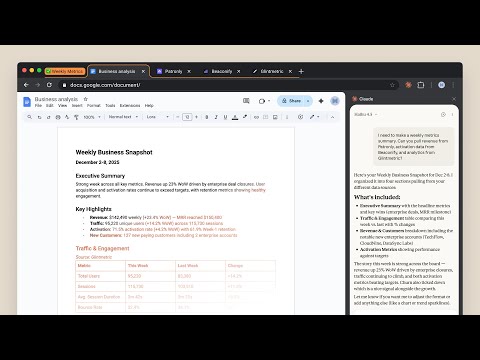
Claude in Chrome A lot of work lives behind a login, on a page with no export button. Claude in Chrome works there. Open the side panel and describe what you're trying to do: Claude reads the page, clicks, types, navigates, and fills forms, while you watch and decide what happens next. Available on all paid plans. WHAT'S NEW The side panel is now Claude Cowork. Same Claude you use on desktop, web, and mobile, in the tab you're already looking at. - Saved sessions: every side panel conversation is kept, so you can come back to it. - Pick up anywhere: start a task in the browser, finish it wherever you keep your files. - Your skills and connectors: the skills, plugins, and connectors you use in Cowork work in the side panel too. - Available on Max and Team. Rolling out to Pro in the coming weeks. Available to Enterprise if enabled by administrator. Also recently: - Scheduled tasks: set recurring browser work that runs on your schedule. - Multi-tab workflows: drag tabs into the Claude tab group and Claude works across all of them. - Console logs: Claude reads errors, network requests, and DOM state while you debug. WHERE YOU WORK FROM This extension is what lets Claude see and act in your browser. Direct that work from wherever you already are: - The side panel, when you're on the page. Nothing else needs to be open. - Claude Cowork for Mac or Windows, when the browser is one step in a job that also touches your files and other tools on your computer. Keep the desktop app running and Claude works in Chrome from there. - Claude Code, when you're building the site you're testing. WHAT PEOPLE USE IT FOR Six invoices, six vendor portals, none of which talk to anything. Claude pulls the numbers into a spreadsheet, and you decide what they mean. - Pull your information out of pages that have no export button. - Fill the forms and do the data entry you've been putting off. - Follow a process across a dozen tabs without losing your place. - Work through your inbox and calendar. - Gather what you need in the browser, then think it through in Claude Cowork. You watch it happen, and you step in whenever you want to. FOR DEVELOPERS Claude Code and the Chrome extension give you a build-test-fix loop: - Design verification: take a design mock, build with Claude Code, check accuracy in the browser. - Live debugging: Claude reads console errors and DOM state, then proposes a fix. - Automated testing: schedule Claude to check your site daily and catch regressions. YOU'RE IN CONTROL Websites can hide instructions that try to redirect Claude's actions. Claude can ask before it acts, one site at a time, and can't reach anything you haven't approved. Or turn on "automatically approve": Claude keeps working while a separate safety check reviews each consequential action first and blocks anything that looks wrong. We build defenses against this and test them, and we still recommend starting on sites you know, reading the prompts when they come, and telling us if Claude does something you didn't ask for. On Team and Enterprise plans, admins enable or disable the extension org-wide and set which sites are allowed. Full safety guide: https://support.claude.com/en/articles/12902428 GETTING STARTED 1. Subscribe to any paid plan 2. Install this extension 3. Sign in with your Claude credentials 4. Open the side panel and describe what you're working on 5. Grant permissions when prompted Note: Claude in Chrome is not supported on other Chromium-based browsers or on mobile devices. Terms of Service: https://www.anthropic.com/legal/consumer-terms, https://www.anthropic.com/legal/commercial-terms Privacy Policy: https://www.anthropic.com/legal/privacy
2.8 จาก 5 คะแนนการให้คะแนน 1.6K รายการ
รายละเอียด
- รุ่น1.0.90
- อัปเดตแล้ว31 สิงหาคม 2569
- ขนาด6.42MiB
- ภาษาEnglish (United States)
- นักพัฒนาซอฟต์แวร์Anthropicเว็บไซต์
548 Market St PMB 90375 San Francisco, CA 94104-5401 USอีเมล
chrome-developer@anthropic.com - ไม่ใช่ผู้ค้านักพัฒนาซอฟต์แวร์รายนี้ไม่ได้ระบุว่าตัวเองเป็นผู้ค้า สำหรับผู้บริโภคในสหภาพยุโรป โปรดทราบว่าสิทธิของผู้บริโภคไม่มีผลกับสัญญาระหว่างคุณกับนักพัฒนาซอฟต์แวร์รายนี้
ความเป็นส่วนตัว

Claude ได้เปิดเผยข้อมูลต่อไปนี้ซึ่งเกี่ยวกับการเก็บรวบรวมและการใช้ข้อมูลของคุณ ดูข้อมูลโดยละเอียดเพิ่มเติมได้ที่privacy policyของนักพัฒนาแอป
Claude จะจัดการสิ่งต่อไปนี้
นักพัฒนาซอฟต์แวร์รายนี้ประกาศว่าข้อมูลของคุณจะ
- ไม่ถูกขายไปยังบุคคลที่สามหากไม่ใช่ Use Case ที่ได้รับอนุมัติ
- ไม่ถูกใช้หรือถูกโอนเพื่อวัตถุประสงค์ที่ไม่เกี่ยวข้องกับฟังก์ชันการทำงานหลักของรายการ
- ไม่ถูกใช้หรือถูกโอนเพื่อพิจารณาความน่าเชื่อถือทางเครดิตหรือเพื่อวัตถุประสงค์การให้สินเชื่อ
สนับสนุน
โปรดเปิดหน้านี้บนเบราว์เซอร์ในเดสก์ท็อป หากมีข้อสงสัย ต้องการขอคำแนะนำ หรือประสบปัญหาใดๆ