


概要
Claude in Chrome
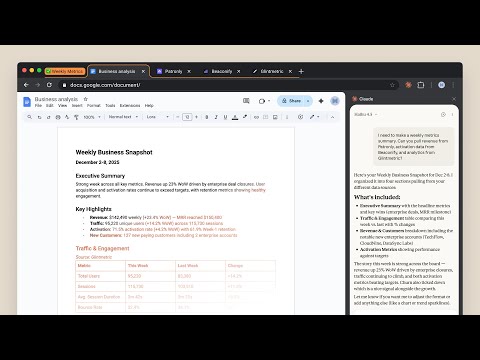
Claude in Chrome A lot of work lives behind a login, on a page with no export button. Claude in Chrome works there. Open the side panel and describe what you're trying to do: Claude reads the page, clicks, types, navigates, and fills forms, while you watch and decide what happens next. Available on all paid plans. WHAT'S NEW The side panel is now the same Claude you use on desktop, web, and mobile, in the tab you're already looking at. - Saved sessions: every side panel conversation is kept, so you can come back to it - Pick up anywhere: start a task in the browser, finish it wherever you keep your files - Your skills and connectors: the skills, plugins, and connectors you use in Claude work in the side panel too - Available on all paid plans. On Enterprise, your admin controls access. Also recently: - Scheduled tasks: set recurring browser work that runs on your schedule - Multi-tab workflows: drag tabs into the Claude tab group and Claude works across all of them - Console logs: Claude reads errors, network requests, and DOM state while you debug WHERE YOU WORK FROM This extension is what lets Claude see and act in your browser. Direct that work from wherever you already are: - The side panel, when you're on the page. Nothing else needs to be open. - The Claude desktop app for Mac or Windows, when the browser is one step in a job that also touches your files and other tools on your computer. Keep the desktop app running and Claude works in Chrome from there. - Claude Code, when you're building the site you're testing. WHAT PEOPLE USE IT FOR Six invoices, six vendor portals, none of which talk to anything. Claude pulls the numbers into a spreadsheet, and you decide what they mean. - Pull your information out of pages that have no export button - Fill the forms and do the data entry you've been putting off - Follow a process across a dozen tabs without losing your place - Work through your inbox and calendar - Gather what you need in the browser, then think it through in Claude on desktop, web, or mobile You watch it happen, and you step in whenever you want to. FOR DEVELOPERS Claude Code and the Chrome extension give you a build-test-fix loop: - Design verification: take a design mock, build with Claude Code, check accuracy in the browser - Live debugging: Claude reads console errors and DOM state, then proposes a fix - Automated testing: schedule Claude to check your site daily and catch regressions YOU'RE IN CONTROL Websites can hide instructions that try to redirect Claude's actions. Claude can ask before it acts, one site at a time, and can't reach anything you haven't approved. Or turn on “automatically approve”: Claude keeps working while a separate safety check reviews each consequential action first and blocks anything that looks wrong. We build defenses against this and test them, and we still recommend starting on sites you know, reading the prompts when they come, and telling us if Claude does something you didn't ask for. On Team and Enterprise plans, admins enable or disable the extension org-wide and set which sites are allowed. Full safety guide: https://support.claude.com/en/articles/12902428 GETTING STARTED 1. Subscribe to any paid plan 2. Install this extension 3. Sign in with your Claude credentials 4. Open the side panel and describe what you're working on 5. Grant permissions when prompted Note: Claude in Chrome is not supported on other Chromium-based browsers or on mobile devices. Terms of Service: https://www.anthropic.com/legal/consumer-terms, https://www.anthropic.com/legal/commercial-terms Privacy Policy: https://www.anthropic.com/legal/privacy
5 点満点で 3.61865 件の評価
詳細
プライバシー

Claude から、お客様のデータの収集と使用に関する以下の情報が開示されています。 詳しくは、デベロッパーの privacy policy をご確認ください。
Claude は次を扱います。
このデベロッパーは、お客様のデータについて以下を宣言しています
- 承認されている以外の用途で第三者に販売しないこと
- アイテムの中心機能と関係のない目的で使用または転送しないこと
- 信用力を判断する目的または融資目的で使用または転送しないこと
サポート
質問や提案、問題がある場合は、パソコンのブラウザでこのページを開いてください