

Claude Usage Bar
1 rating
)
Overview
Claude usage overlay with privacy-safe usage metadata.
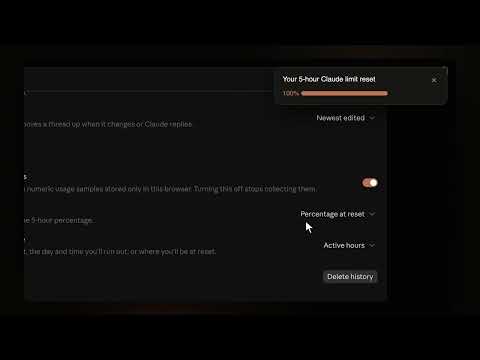
Claude Usage Bar adds a compact usage overlay directly inside claude.ai so you can track your Claude limits and current chat context without leaving the composer. - Usage bar built into Claude's composer, with hover details for your 5-hour and weekly limits, reset times, and where you're headed at reset - Context window ring or percentage, with a breakdown of what's filling it: your messages, Claude's replies, thinking, tools, attachments and system overhead - Prompt cache timer in the chat header - Message navigator: a mark on the right edge for every message you sent, click one to jump to it - Thread view for Claude's sidebar: threads waiting on you come first, then finished work, then work still running. Settle a card when you're done with it. Works in Claude Code too - Reset alerts: a banner when your 5-hour or weekly limit resets, on claude.ai or (with permission) any site - Toolbar popup with live usage, message history charts, model split and streaks - Settings live inside Claude's own settings page - Follows Claude's language, in all 35 languages Claude supports WHAT'S NEW IN 1.7: New: - Thread view: turns Claude's sidebar into cards. Anything waiting on you (a question, a permission request, an error) comes first, then finished work, then work still running. Settle a card when you're done with it. It keeps its place across reloads and restarts, starts with your 3 latest chats, and works in the Code tab too. - Message navigator is back, with its own switch under Display. - Percentage at reset: the weekly estimate can show where your usage will land at reset, based on when you usually use Claude. - Context window can show a percentage instead of the ring. - Usage Bar now follows Claude's own language and supports all 35 of Claude's languages (24 new ones are machine-translated). - New onboarding tour with previews of the cache timer and thread view, so you can turn them on right there. Improvements: - The usage bar is on by default and sits in the empty space of the composer toolbar, or on its own row when the window is narrow. - Settings reorganized into Display, Sidebar, Pacing, Reset alerts and General, inside Claude's redesigned settings. - Simpler reset banner that fills up and can be swiped away. Clicking it opens a new chat. - Prompt Clipboard is being retired: a button converts your saved prompts into Claude skills. Bug fixes: - Fixed the usage bar missing on the new-chat page and on Claude Design after Claude's October redesign. - Fixed "Usage Bar" missing from Claude's redesigned settings. - Fixed the prompt clipboard inserting a prompt twice. - Fixed the cache timer overlapping header buttons in narrow windows. - Fixed the usage details panel staying open over settings after clicking its arrow. - Fixed a stray navigator mark carried over from the previous chat. Claude Usage Bar is privacy-first. It uses your existing logged-in Claude browser session to read usage information on claude.ai, but it does not store your prompts, responses, cookies, auth headers, or raw Claude API payloads. It does not send your conversation text to anyone and doesn't have access to connections outside what your claude page provides. Settings, sanitized usage metadata, numeric token or context estimates, and the thread view's chat IDs and timestamps stay in your local browser storage. You have easy access to your stored data and how to delete it. If you have any feature requests, please e-mail me or include in reviews.
5 out of 51 rating
Details
- Version1.7.0
- UpdatedNovember 1, 2026
- Offered byRyo
- Size1.37MiB
- LanguagesEnglish (United States)
- Developer
Email
utmostelf5752@gmail.com - Non-traderThis developer has not identified itself as a trader. For consumers in the European Union, please note that consumer rights do not apply to contracts between you and this developer.
Privacy

Claude Usage Bar has disclosed the following information regarding the collection and usage of your data. More detailed information can be found in the developer's privacy policy.
Claude Usage Bar handles the following:
This developer declares that your data is
- Not being sold to third parties, outside of the approved use cases
- Not being used or transferred for purposes that are unrelated to the item's core functionality
- Not being used or transferred to determine creditworthiness or for lending purposes