

Claude Shortcut Effective Extension
1 rating
)
Overview
Safer send, vim-like scroll, model toggles, temporary chats, and clean UI for Claude.
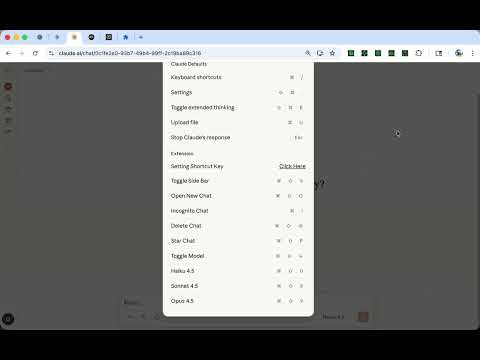
Description*: Claude Shortcut Effective Extension enhances your experience on claude.ai with productivity-focused shortcuts and UI improvements. Features: - Safe Send: Press Enter to insert a newline; Cmd/Ctrl+Enter sends the message. Prevents accidental sends while drafting long prompts. - Vim-like Scrolling: Use j/k to scroll, Shift+J/K for half-page jumps, and Cmd/Ctrl+J/K to jump to the bottom or top. Scrolling is disabled when typing in input fields. - Wide Screen / Focus Mode: Removes header blur, widens the content area, and provides a toggle to focus on the composer. - Sidebar Shortcuts: Pin/unpin sidebar, open new chat, start incognito (temporary) chat, star or delete the current conversation. - Model Switching: Open the model dropdown or jump directly to Haiku 4.5, Sonnet 4.5, or Opus 4.5 with keyboard shortcuts. All features can be toggled on or off in the popup. Custom keyboard bindings are supported and saved via Chrome sync storage. This extension works exclusively on https://claude.ai/* and does not collect, transmit, or store any personal data. Open source: https://github.com/gakkunn/Ex-Chrome-Claude
5 out of 51 rating
Details
- Version1.5.2
- UpdatedApril 13, 2026
- Offered byyoshi
- Size1.29MiB
- Languages10 languages
- Developer
Email
yoshi.apps.contact@gmail.com - Non-traderThis developer has not identified itself as a trader. For consumers in the European Union, please note that consumer rights do not apply to contracts between you and this developer.
Privacy

This developer declares that your data is
- Not being sold to third parties, outside of the approved use cases
- Not being used or transferred for purposes that are unrelated to the item's core functionality
- Not being used or transferred to determine creditworthiness or for lending purposes