

Claude Pulse - Daily & Weekly Usage Tracker

Overview
Claude.ai usage dashboard with live limits, reset countdowns, burn rate, history, and overlay. Your data stays in-browser.
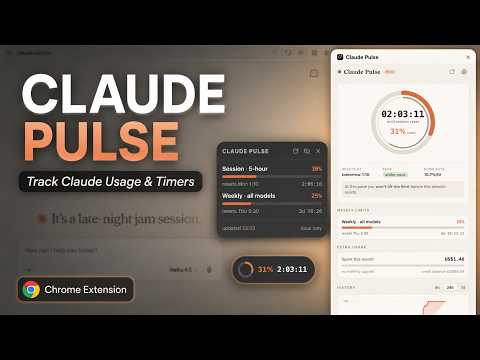
Claude Pulse is a fully local usage dashboard for claude.ai. It reads the usage numbers claude.ai already exposes to your logged-in browser session and turns them into a live side-panel dashboard plus an optional on-page overlay. Your data stays entirely in your browser. No servers, no analytics, no external accounts, and no remote code. All metrics live securely in chrome.storage.local. WHAT YOU GET Side Panel Dashboard - Session Gauge: Dual-ring progress indicator (outer ring shows usage %, inner thin ring shows how much of the 5-hour window has elapsed). - Live Countdown: Real-time ticking timer (hh:mm:ss) until your session resets, along with the exact local reset time. - Pace Indicator: Tells you instantly if you are ahead of or behind your quota pace. - Burn Rate & Forecast: Calculates your usage speed (%/hr) based on local history and projects when you'll hit your limit (e.g., "at this pace you'll hit the limit around 3:42 PM"). - Weekly Limits: Tracks all weekly limits for your plan (all-models and per-model) with progress bars and independent countdowns. - Extra Usage: Monitors monthly spend and credit balances when enabled on your account. - History Chart: Interactive 6-hour, 24-hour, and 7-day usage graphs built from local snapshots. On-Page Overlay (claude.ai) - Three Styles: Choose between Dot (tiny ring), Pill (ring + % + live countdown), or Card (always-expanded mini panel). - Fully Customizable: Drag it anywhere on the page (position is remembered), adjust opacity, or toggle visibility from settings. Power Features - Dynamic Toolbar Badge: Displays live session percentages with automatic color shifts (green to amber to red). - Smart Alerts: Optional threshold notifications at 80% and 95%, plus alerts when limits reset. - Personalization: Dark, light, and auto themes with 5 accent colors and a compact layout mode. - Auto-Refresh: Configurable refresh intervals (30s to 5m) plus instant re-checks shortly after you send a message. PRIVACY FIRST Claude Pulse requires minimal permissions strictly for functionality: - storage: Saves your settings, cached state, and local history. - alarms: Powers periodic auto-refresh routines. - cookies: Reads the active organization cookie on claude.ai. - sidePanel: Powers the main dashboard interface. - notifications: Delivers optional threshold alerts. - https://claude.ai/*: Fetches official usage data and injects the optional overlay.
0 out of 5No ratings
Details
- Version1.0.0
- UpdatedJuly 27, 2026
- Offered byOnkarPawar
- Size42.53KiB
- LanguagesEnglish
- Developer
Email
onkarpwr242@gmail.com - Non-traderThis developer has not identified itself as a trader. For consumers in the European Union, please note that consumer rights do not apply to contracts between you and this developer.
Privacy

This developer declares that your data is
- Not being sold to third parties, outside of the approved use cases
- Not being used or transferred for purposes that are unrelated to the item's core functionality
- Not being used or transferred to determine creditworthiness or for lending purposes