

Claude Limit & Usage Tracker + Fable 5 - ClaudeKarma

Overview
Track your Claude AI usage limits without leaving your tab: 5-hour session, weekly and Fable 5 limits, in your toolbar.
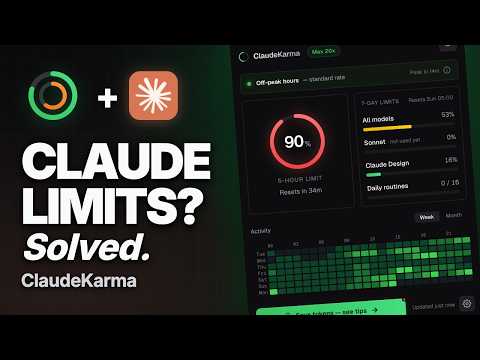
Track your Claude usage limits without leaving your tab. ClaudeKarma shows how much of your 5-hour session and your weekly limit you have used, when each one resets, and your Fable 5 limit, right in your Chrome toolbar. Stop guessing how much Claude you have left. Stop hitting "you have reached your limit" in the middle of a prompt. Free. Your data stays in your browser. Works with Free, Pro, Max, Ultra, Team and Enterprise accounts. YOUR LIMITS IN THE TOOLBAR The toolbar icon shows two rings: the outer ring is your 5-hour session (your weekly limit on Ultra), the inner ring is your weekly limit (on Ultra, your highest weekly limit for a single model). They go from green to yellow, orange and red as you get close. At 90% the icon blinks. Notifications at 75%, 90% and 100%, which you can change or turn off in settings. EVERY CLAUDE LIMIT IN ONE CLICK - 5-hour session limit, with its reset time - Weekly limit, with its reset day and time - Fable 5 weekly limit, as its own highlighted bar - Usage per model: all models, Fable 5, Opus, Sonnet, Haiku and Claude Design - Extra Usage in real money: monthly spend, prepaid balance left and your credit cap - Your scheduled Claude Code routines, when your plan includes them - Your plan at a glance: Free, Pro, Max, Ultra, Team or Enterprise WEEKLY PACE AND FREE RESETS ClaudeKarma tells you when, at your current pace, you will run out before the weekly reset. When Anthropic gives you a free limit reset, the popup shows it with a direct link to use it. PEAK HOURS A live peak/off-peak banner with a countdown to the next change, following Anthropic's published schedule (weekdays 5 to 11 AM Pacific Time). The schedule updates on its own when Anthropic changes it, with no extension update. On Pro and Max, peak hours apply to chat sessions, not Claude Code. Ultra accounts without a 5-hour limit don't see the banner. ULTRA PLAN Verified Ultra accounts have no 5-hour limit, so on Ultra the gauge and the toolbar icon lead with your weekly limit, labelled "Ultra: no 5-hour limit". Pro and Max keep their 5-hour session gauge. FREE PLAN Claude no longer shows usage data to Free accounts. ClaudeKarma estimates your 5-hour session from your own recent messages, and gets more accurate each time you tell it you hit the limit. If Claude brings the data back, exact tracking returns on its own. CLAUDE HOURS HEATMAP An hourly grid of when you use Claude across the week or the month, so you can plan heavy work around your limits. KARMA LEVELS Six small milestones, from Tracker to Foresight, shown as a star badge in the popup. Turn it off in settings if you prefer. LIGHT AND DARK MODE Follows your system setting, or pick light or dark from the header. PRIVACY FIRST ClaudeKarma keeps your data on your device. Your usage history, your settings and your Karma progress all live in your browser, in chrome.storage.local. During normal use the extension contacts: - claude.ai, to read your own usage and credits data with your existing session (no password ever stored) - tokenkarma.app, without cookies or identifiers, for public configuration files that are the same for every user: the peak hours schedule and the Free plan estimate settings - one anonymous daily heartbeat: extension version, operating system, browser language, how many usage reads succeeded or failed, and days since the last successful read. No account, no usage data, no identifier. No analytics, no third-party tracking SDKs, no fingerprinting inside the extension. When you uninstall, Chrome opens a short feedback page on tokenkarma.app where the extension version, your browser language, your operating system, your plan type and a handful of anonymous health counters (whether the extension could read your usage, and which errors it hit) are passed as plain query parameters, so we can tell why it did not work for you. You can close the tab without answering. Full transparency on this and everything else: https://tokenkarma.app/claudekarma/privacy REQUIREMENTS - A Claude account - Signed in on claude.ai in this browser WHAT'S NEW IN 1.6 Ultra plan support: on verified Ultra accounts, the gauge and the toolbar icon lead with your weekly limit. ALL YOUR AI LIMITS ON YOUR SCREEN ClaudeKarma is made by tokenkarma. The tokenkarma app for Mac and Windows keeps your limits and what you actually pay, across your AI tools, on your screen while you work: https://tokenkarma.app/?utm_source=cws&utm_medium=listing&utm_campaign=claudekarma Free tips on getting more from your limits: https://tokenkarma.app/tips Independent project. Not affiliated with Anthropic. Privacy policy: https://tokenkarma.app/claudekarma/privacy Made by Jean-Rémi Larcelet-Prost.
4.7 out of 5129 ratings
Details
- Version1.6.4
- UpdatedNovember 18, 2026
- Size272KiB
- Languages9 languages
- DeveloperWebsite
Email
tabkarma@duck.com - Non-traderThis developer has not identified itself as a trader. For consumers in the European Union, please note that consumer rights do not apply to contracts between you and this developer.
Privacy

Claude Limit & Usage Tracker + Fable 5 - ClaudeKarma has disclosed the following information regarding the collection and usage of your data. More detailed information can be found in the developer's privacy policy.
Claude Limit & Usage Tracker + Fable 5 - ClaudeKarma handles the following:
This developer declares that your data is
- Not being sold to third parties, outside of the approved use cases
- Not being used or transferred for purposes that are unrelated to the item's core functionality
- Not being used or transferred to determine creditworthiness or for lending purposes