


Overview
Download a Claude artifact as HTML, PDF, PNG or JPG. Exactly as it appears on claude.ai!
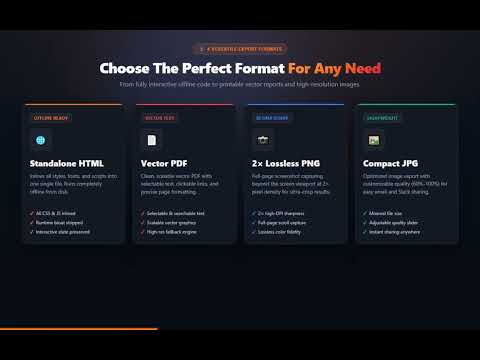
Save and export Claude artifacts from claude.ai as standalone HTML, vector PDF, crisp 2× PNG, or lightweight JPG — rendered exactly as they appear in your conversation, with zero copy-pasting. 🚀 Why Claude Artifact Downloader? Claude artifacts are powerful—interactive web apps, data visualizations, design prototypes, and styled documents. But sharing or preserving them outside claude.ai is frustrating: • Manual copy-pasting leaves behind stylesheets, fonts, and embedded assets. • Standard browser screenshots cut off content that scrolls beyond the viewport. • Shared links can expire or require recipient logins. Claude Artifact Downloader captures the rendered artifact frame directly from your conversation and packages it cleanly into your format of choice. What you see is truly what you get. ✨ Supported Export Formats 🌐 Self-Contained HTML Bundles styles, scripts, fonts, and inline assets into one single, portable .html file. Automatically strips unnecessary claude.ai platform runtime code (~2.3 MB) so your saved artifact opens cleanly, quickly, and functions offline without external dependencies. 📄 Vector PDF Produces clean, multi-page or single-page vector PDFs with sharp text and selectable content. Falls back automatically to high-resolution image PDFs for complex canvas-rendered visuals. 📸 Lossless PNG (2× Sharpness) Full-page, high-resolution screenshot captured beyond the visible viewport with 2× pixel density for razor-sharp readability on Retina and 4K displays. 🖼️ Compact JPG Full-page capture with adjustable quality compression (60%–100%) for easy sharing in emails, documentation, or chat apps. ⚙️ Powerful Customization Options Customize your export directly from the extension popup: • Image Resolution: Toggle between 2× (ultra-sharp, default) and 1× (smaller file size). • JPG Quality Slider: Fine-tune image compression from 60% to 100% (default 92%). • Remove Claude Runtime: Enabled by default to keep saved HTML files lightweight, clean, and free of platform bloat. • Static Snapshot Mode: Freeze dynamic JavaScript apps into pure static HTML snapshots for fail-safe, long-term archiving. 🛠️ How It Works in 3 Easy Steps Open any conversation with a visible artifact on claude.ai. Click the Claude Artifact Downloader icon in your browser toolbar. Select your desired format (HTML, PDF, PNG, or JPG). Your exported file is saved automatically to your Downloads/Claude Artifacts/ folder! 🔒 Privacy & Permissions Your privacy is paramount: • 100% Local Execution: All extraction, bundling, and rendering happen entirely inside your browser. • Zero Third-Party Servers: No external APIs, no tracking scripts, and no analytics. • Your Data Stays Yours: Your conversations and artifacts never leave your computer. 📋 Requirements • Google Chrome version 116 or higher (or compatible Chromium-based browsers like Edge, Brave, and Opera). • Active session on claude.ai with an open artifact.
0 out of 5No ratings
Details
- Version1.2
- UpdatedNovember 14, 2026
- Size48.49KiB
- LanguagesEnglish (United States)
- DeveloperWebsite
Email
dev@appz.se - Non-traderThis developer has not identified itself as a trader. For consumers in the European Union, please note that consumer rights do not apply to contracts between you and this developer.
Privacy

Claude Artifact Downloader has disclosed the following information regarding the collection and usage of your data. More detailed information can be found in the developer's privacy policy.
Claude Artifact Downloader handles the following:
This developer declares that your data is
- Not being sold to third parties, outside of the approved use cases
- Not being used or transferred for purposes that are unrelated to the item's core functionality
- Not being used or transferred to determine creditworthiness or for lending purposes