


Overview
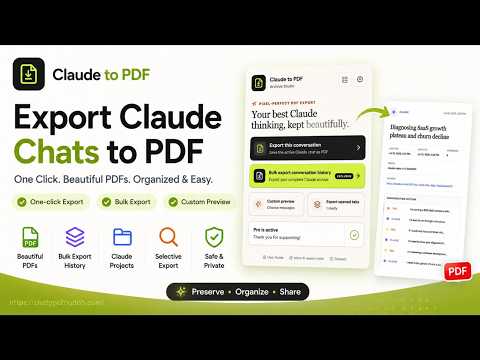
Bulk Export Claude ai conversations to PDF with one-click.
Turn your Claude conversations into polished, easy-to-read PDF archives. Claude AI to PDF helps you save a single chat, multiple open conversations, selected chats, complete conversation history, or conversations from Claude Projects. It uses your existing signed-in Claude session and gives you flexible controls for organizing, previewing, and exporting your content. KEY FEATURES • One-click export: Save the conversation in your active Claude tab as a PDF. • Export opened tabs: Convert all open Claude conversation tabs in one action. • Bulk history export: Export the currently loaded page or progressively process your complete Claude conversation history. • Selective export: Search your loaded conversations and choose exactly which chats to save. • Claude Projects support: Export entire projects or select individual conversations within a project. • Custom preview: Review the conversation before exporting, include only the messages you want, or filter the selection by participant. • Rich content support: Preserve readable Markdown, headings, lists, links, code blocks, tables, images, attachment references, and Claude Artifact version history when available. • Linked conversation outline: Quickly navigate long exported conversations from an automatically generated outline. • Flexible PDF appearance: Choose from three conversation styles and Light, Dark, or Eye-care color themes. • Optional metadata: Include creation and update dates, message count, model, project, and source link. • Organized downloads: Choose a download folder and save supported conversation assets alongside each PDF. • Export tracking: View progress, review recent export results, identify failures, and avoid exporting the same history items twice. HOW IT WORKS 1. Sign in to Claude and keep a Claude.ai tab open. 2. Open the extension and choose a quick export, custom preview, or the full Export Center. 3. Select your conversations and preferences, then start the export. Finished files are saved through your browser's download manager. PLAN INFORMATION The free plan includes up to five successful conversation exports per local day. An optional Pro plan unlocks unlimited exports. 📌 IMPORTANT LINKS (HOW-TO & SUPPORT) • Official Website: https://chatgpt2notion.com/products/claude-to-pdf/ • User Guide: https://chatgpt2notion.com/docs/claude-to-pdf/one-click-export/ • GitHub Issues: https://github.com/joysey/chatgpt-to-notion/issues • Support Email: chatgpt2notion@gmail.com NOTES • A signed-in Claude.ai session is required. • Availability of conversation content, projects, attachments, and Artifacts depends on your Claude account and the source conversation. • Export preferences, usage status, duplicate records, and export history are stored in Chrome local storage. • Claude AI to PDF is an independent extension and is not affiliated with, endorsed by, or sponsored by Anthropic. Claude is a trademark of Anthropic PBC. Changelog: 2026-09-02 • Optimize Claude Projects export handling; • Add support for UI text language switching. 2026-07-20 • Fixed: Restored reliable Claude workspace ID detection for current Claude pages
5 out of 57 ratings
Details
- Version2.0.0
- UpdatedSeptember 3, 2026
- Size643KiB
- Languages17 languages
- Developer
- Non-traderThis developer has not identified itself as a trader. For consumers in the European Union, please note that consumer rights do not apply to contracts between you and this developer.
Privacy

Claude AI to PDF has disclosed the following information regarding the collection and usage of your data. More detailed information can be found in the developer's privacy policy.
Claude AI to PDF handles the following:
This developer declares that your data is
- Not being sold to third parties, outside of the approved use cases
- Not being used or transferred for purposes that are unrelated to the item's core functionality
- Not being used or transferred to determine creditworthiness or for lending purposes
Support
For help with questions, suggestions, or problems, please open this page on your desktop browser