

Classic View for Seller Central: Keep the Old Layout Automatically

Overview
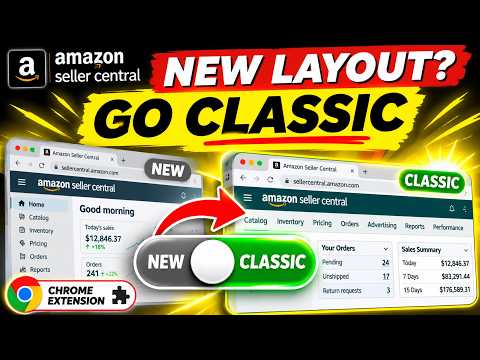
New Seller Central UI? Hard pass. Keep 75+ Seller Central screens on the classic, old layout. Free for a day, then $9.99/mo.
A brand-new UI to learn. In Q4. Hard pass. Classic View is a Chrome extension that keeps Amazon Seller Central on the classic layout. Install it once and the old Seller Central stays put through clicks, refreshes, bookmarks and new tabs, wherever a classic page exists, instead of switching you back to the new Seller Central. You know the routine. You pick classic. One click later you're back in the new layout. Manage Inventory is somewhere. "Return to previous version" is everywhere. Your SOPs describe screens you can't find. And you have orders to ship. Status update: Sanity: reinstated. Classic pages stay classic through clicks, refreshes, bookmarks, new tabs and Amazon's own redirects. Nothing to set up. Done. Work mode: unsuppressed. Manage Orders opens your order list again, with the Pending, All orders and Canceled tabs. Manage All Inventory opens the table you know. SOPs: reactivated. Your checklists and training videos match the screen again. New VAs learn one layout, not two. "Previous version" clicks: retired. No more clicking "Return to previous version". Redesigned pages open in their previous version on their own: FBA inventory (including Restock), Shipments, Manage returns, Returns insights and Finance reports. Choice: restored. Like a new page? Keep it. Set Orders, FBA inventory, Shipments, Returns, Reports, Payments and more to Classic or New. 13 sections in all. How it works: no magic. Amazon still hosts the classic versions of many Seller Central pages, and already gives you ways to reach them: the classic switch, the ngs_do_not_redirect_flag link setting and the "Return to previous version" buttons. Classic View does that for you as each page loads, wherever a classic version exists. It adds Amazon's own classic setting to the page address. The flag alone doesn't bring back redesigned pages like FBA inventory, Shipments and Manage returns, so for those it opens the previous-version address. It doesn't rebuild, restyle or edit any page. Everything you see is served by Amazon. Classic lifespan: Amazon's call. Because Classic View opens Amazon's own classic pages, it can only open the ones Amazon still hosts. When Amazon retires a classic page, that page opens in the new layout, and no extension can bring it back. Think of Classic View as a shortcut to classic, not a time machine. We track Amazon's changes and update Classic View when pages move, so the classic pages that still exist keep opening classic. If Amazon ever retires classic Seller Central altogether, there will be nothing left to switch to, and Classic View's job will be done. Other limits: disclosed. Workspace tools and FBA returns only exist in the new experience, so they always open there. Filters in links to redesigned pages are not carried over to the previous version. If a page keeps bouncing between addresses, Classic View steps aside on that tab instead of looping. Setup: none required. 1. Add Classic View to Chrome. 2. Open Seller Central. Pages that still have a classic version load in it. That's it. Optional: click the Classic View button in the toolbar to switch the section you're on, or open Settings to set every section in one place. Licensing: per person, or per team. Subscribe each ($9.99 a month), or buy team seats: pick exactly how many you need, and one key covers the whole team, shared in Slack. Per seat per month: 1 seat $9.99, 2-4 seats $7.99, 5-9 $5.99, 10-19 $4.99, 20 or more $3.99 (5 seats = $29.95, 11 seats = $54.89). Teammates paste the key into Settings. Nobody signs in, and nobody needs the buyer's email. In Classic View: Settings > Buying for a team? Your data: untouched. Classic View never collects or sends your listing, order or sales data. It looks only at Seller Central page addresses, on your computer, to pick the layout. The only outside services it contacts are for your license: ExtensionPay, or Lemon Squeezy if you use a team key. Pricing: no surprises. Free for one day from install. No email, no card. Then $9.99 a month through ExtensionPay and Stripe (card, Apple Pay, Google Pay or Link). Cancel anytime from Settings, and it keeps working until the end of the month you paid for. On a second computer, restore your subscription by logging in with your email. Coverage: 23 marketplaces. Works on 25 Seller Central sites, for the US, Canada, Mexico, Brazil, the UK, Germany, France, Italy, Spain, the Netherlands, Sweden, Poland, Belgium, Turkey, Ireland, the UAE, Saudi Arabia, Egypt, India, South Africa, Japan, Australia and Singapore. Settings sync through Chrome sync. Questions sellers ask How do I switch back to classic Seller Central and stay there? Install Classic View. Pages that still have a classic version open in it, without clicking the classic switch each time. Why does Seller Central keep switching me back to the new layout? Amazon's classic choice only lasts for the page you're on. Classic View applies it to each Seller Central page as it loads, wherever a classic version exists. Can I keep classic for some sections and the new layout for others? Yes. Set each of 13 sections, such as Orders, FBA inventory, Shipments, Returns, Reports and Payments, to Classic or New. Does Classic View collect my seller data? No. It never collects or sends listing, order or sales data. To pick the layout, it looks at Seller Central page addresses on your computer, and never stores or sends them. What happens if Amazon removes the old layout? Any page Amazon no longer hosts in classic opens in the new layout. Classic View keeps opening the classic pages that remain, and we update it as Amazon moves pages. Does it work outside the US? Yes. It works in all 23 Seller Central marketplaces listed above, on 25 sites. More questions: nathan@sellinginsider.com Not affiliated with, endorsed by, or sponsored by Amazon. Amazon and Seller Central are trademarks of Amazon.com, Inc. or its affiliates.
0 out of 5No ratings
Details
- Version2.0.1
- UpdatedNovember 12, 2026
- FeaturesOffers in-app purchases
- Offered bySelling Insider
- Size138KiB
- LanguagesEnglish
- DeveloperSelling Insider
121 S BROADWAY AVE STE 824 Tyler, TX 75703 USEmail
nathan@sellinginsider.comPhone
+1 903-363-7488 - TraderThis developer has identified itself as a trader per the definition from the European Union and committed to only offer products or services that comply with EU laws.
- D-U-N-S845410278
Privacy

Classic View for Seller Central: Keep the Old Layout Automatically has disclosed the following information regarding the collection and usage of your data. More detailed information can be found in the developer's privacy policy.
Classic View for Seller Central: Keep the Old Layout Automatically handles the following:
This developer declares that your data is
- Not being sold to third parties, outside of the approved use cases
- Not being used or transferred for purposes that are unrelated to the item's core functionality
- Not being used or transferred to determine creditworthiness or for lending purposes
Support
For help with questions, suggestions, or problems, please open this page on your desktop browser