


Overview
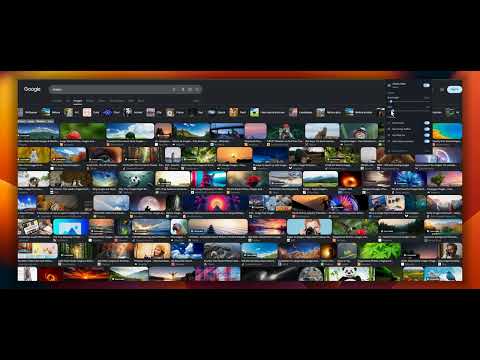
Restore classic Google Images rows with hover zoom, View Image, size filters, AI image controls, and less clutter.
Bring back the classic Google Images layout with clean horizontal rows, hover zoom, direct image access, AI image controls, and fewer distractions. Classic View for Google Images™ restores the efficient old Google Images layout many desktop users still prefer. It replaces the modern masonry grid with clean, justified horizontal rows while preserving the natural aspect ratio of each image. KEY FEATURES: 🖼️ Classic Horizontal Row Layout Replace the staggered masonry grid with clean, justified horizontal rows. Images keep their natural aspect ratios without awkward vertical cropping. 🔍 Hover Image Zoom Hover over any thumbnail to see a larger preview instantly. Smart positioning keeps the preview inside your browser window. 🔗 Direct View Image Button Open the full-resolution source image directly from the thumbnail in a new browser tab. ✨ Mark or Hide AI-Generated Images Mark likely AI-generated images with a small AI badge or hide them from the results. Detection runs locally in your browser and uses signals already available on the Google Images page, including Google labels, result titles, descriptions, source domains, filenames, available metadata, popular generator names, and AI-specific search queries. No images are uploaded or analyzed by an external AI service. Detection is rule-based and may not identify every AI-generated image. 🎯 Size Filter Quick Bar Filter results using convenient size controls placed above the image grid: All sizes, Large, Medium, and Icon. 🚫 Hide Related Searches Remove related-search blocks and carousels that take up space between image results. ⚙️ Customizable and Lightweight • Adjust row height from 120px to 300px. • Change spacing between image tiles. • Enable or disable individual features. • Apply layout changes without reloading the page. • Sync preferences through your Chrome profile. 🐞 Easy Bug Reporting Use the Report issue link in the extension popup to open a prefilled GitHub issue. The report includes only the extension version, Chrome version, and current Google domain. Nothing is submitted automatically. Classic View for Google Images™ is built for people who miss the old Google Images layout and want a cleaner, faster desktop browsing experience. PRIVACY AND COMPATIBILITY: • No Data Collection: The extension does not collect, store, sell, or transmit personal data, search history, or viewed images. • Local AI Detection: AI image detection runs entirely in your browser using information already present on the search results page. • No Analytics or Tracking: The extension contains no analytics, advertisements, or third-party tracking. • Lightweight Page Changes: The extension uses CSS and local page adjustments while preserving native Google Images functionality. Google Images™ is a trademark of Google LLC. Classic View for Google Images™ is an independent extension and is not affiliated with or endorsed by Google LLC.
4.7 out of 515 ratings
Details
- Version0.5.7
- UpdatedNovember 1, 2026
- Size68.62KiB
- LanguagesEnglish
- DeveloperWebsite
Email
haser88@gmail.com - Non-traderThis developer has not identified itself as a trader. For consumers in the European Union, please note that consumer rights do not apply to contracts between you and this developer.
Privacy

This developer declares that your data is
- Not being sold to third parties, outside of the approved use cases
- Not being used or transferred for purposes that are unrelated to the item's core functionality
- Not being used or transferred to determine creditworthiness or for lending purposes
Support
For help with questions, suggestions, or problems, visit the developer's support site