


Overview
Timed classic maze in a popup—reach the exit before time runs out.
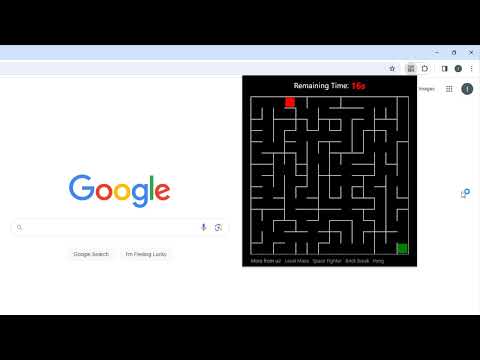
Just click the Maze extension icon in the top-right corner of your browser, and the maze opens instantly in a popup! Every maze is randomly generated, so you'll get a new challenge each time you start or restart. Your objective is to guide the red block from the top-left corner to the green block in the bottom-right corner before the 20-second timer runs out. Control the red block using the Arrow keys or WASD. The timer bar at the top shows how much time you have left. When the game ends, press Restart or simply hit Space or Enter to begin a new maze. After the game ends, you can keep going with these optional actions: • Play Next Level – Same classic maze format, but bigger and harder. • Try two featured free game extensions from us for more fun. Enjoy the maze challenge! CHANGELOG ========== Version 0.4.6 - 0.4.8 - Clean outdated codes and bugfix - Remove competition features - Update game name and description Version 0.2.0 - 0.4.5 - Add the link of playing the next level - Add the feature of competitions - Add the link of maze world - Add WASD movement support - Prettify code and styles - Add google analytics Version 0.1.0 - 0.1.9 - Initial release and feature updates - Fix allowing moves after failure - Enable Space/Enter keys to restart
4.3 out of 543 ratings
Details
- Version0.4.8
- UpdatedOctober 30, 2026
- Size31.25KiB
- LanguagesEnglish
- DeveloperWebsite
Email
gameany.contact@gmail.com - Non-traderThis developer has not identified itself as a trader. For consumers in the European Union, please note that consumer rights do not apply to contracts between you and this developer.
Privacy

Classic Maze has disclosed the following information regarding the collection and usage of your data. More detailed information can be found in the developer's privacy policy.
Classic Maze handles the following:
This developer declares that your data is
- Not being sold to third parties, outside of the approved use cases
- Not being used or transferred for purposes that are unrelated to the item's core functionality
- Not being used or transferred to determine creditworthiness or for lending purposes
Support
For help with questions, suggestions, or problems, visit the developer's support site