


Overview
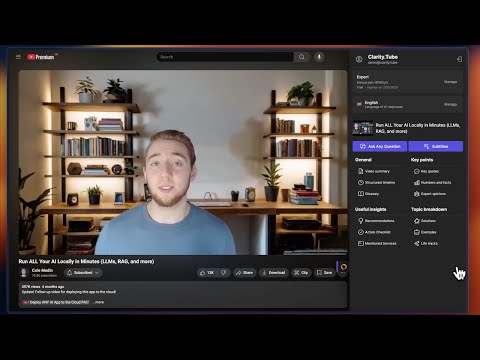
AI-powered YouTube assistant transforms videos into smart summaries. Get key points and structured insights in your language.
🚀 Turn 2-hour YouTube videos into 1-minute structured insights with 11 analysis templates and AI chat for deeper learning. 🎯 Clarity.Tube transforms YouTube videos into structured insights, summaries, and key points in any language. Use this extension to learn faster and save hours of watching time. 🔍 What are the benefits of using Clarity.Tube? 📝 Get video summary with key ideas and takeaways 🎬 Navigate through video timeline with key moments 🗣️ Access important quotes and expert opinions 🔢 Extract facts, numbers and statistics 🛠️ Find all mentioned tools and services 🧐 Get problem-solution breakdowns 🌎 Explore real-world examples 💡 Access useful life hacks 🤖 Chat with AI about Video 🌐 Learn in your preferred language ⚡ Save up to 95% of watching time with AI-powered analysis 🛠️ How do I use Clarity.Tube? 1️⃣ Simply install the extension 2️⃣ Open any YouTube video 3️⃣ Click the Clarity.Tube icon 4️⃣ Instantly get a structured breakdown 5️⃣ Click timeline markers to jump to specific sections 🌍 Does Clarity.Tube work with different languages? Yes! Clarity.Tube can analyze videos in any language and provide summaries in your preferred language, making it a truly multilingual learning tool. 🔗 For more details, visit: https://clarity.tube
5 out of 51 rating
Details
- Version0.2.1
- UpdatedJuly 4, 2025
- FeaturesOffers in-app purchases
- Size1.55MiB
- Languages8 languages
- DeveloperWebsite
Email
support@clarity.tube - Non-traderThis developer has not identified itself as a trader. For consumers in the European Union, please note that consumer rights do not apply to contracts between you and this developer.
Privacy

Clarity.Tube – AI-Powered Insights for YouTube has disclosed the following information regarding the collection and usage of your data. More detailed information can be found in the developer's privacy policy.
Clarity.Tube – AI-Powered Insights for YouTube handles the following:
This developer declares that your data is
- Not being sold to third parties, outside of the approved use cases
- Not being used or transferred for purposes that are unrelated to the item's core functionality
- Not being used or transferred to determine creditworthiness or for lending purposes
Support
For help with questions, suggestions, or problems, please open this page on your desktop browser