

ClarityRead — Reading Mode + Dyslexia Support
평점 3개
)
개요
Toggle dyslexia-friendly font, reflow text, contrast, and read-aloud on any page.
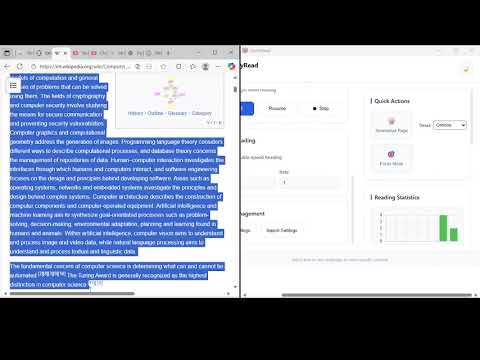
ClarityRead — Reading Mode & Dyslexia Support ClarityRead makes any web page easier to read — instantly. Toggle a dyslexia-friendly font, reflow long articles into a comfortable single-column layout, switch to high-contrast or inverted color modes, and use built-in read-aloud to listen to content. It’s designed for students, people with dyslexia, and anyone who just wants a calmer, clearer reading experience. Key features • Dyslexia-friendly font — switch to OpenDyslexic to improve letter differentiation and reduce reading fatigue. • Reflow text — narrow wide pages into a comfortable single-column layout with adjustable font size and line height. • High contrast & invert modes — quickly toggle improved contrast or inverted colors for low-light or high-contrast reading. • Read-aloud — browser TTS support with highlighting overlay so you can listen as the content is read. • Focus Mode — open the page in a distraction-free reader overlay to remove sidebars, ads, and comments. • Works on most sites — the extension uses a robust content extractor, but always respects site restrictions. Why install ClarityRead? • Helps readers who struggle with long pages or visual clutter. • Fast toggle — enable/disable features with one click. • Lightweight — built to be fast and respect your privacy. • Customizable — font size, line height, and read speed are adjustable. Permissions & privacy ClarityRead only requests the permissions required to extract page content for reflow and read-aloud. I do not collect personal browsing data or sell data to third parties. See my privacy policy for full details (link in the listing). Get started Install ClarityRead, click the extension icon, and try the toggles: Dyslexia font, Reflow, Contrast, and Read-aloud. See the demo video on the ClarityRead webpage or access it directly with this link: https://www.youtube.com/watch?v=kjRNsqQO0W0
5점 만점에 4.3점평점 3개
세부정보
- 버전0.9.0
- 업데이트됨2026년 2월 27일
- 제공ttonnaagburu
- 크기329KiB
- 언어English (United States)
- 개발자
이메일
ttonnaagburu@gmail.com - 비판매자판매자로 식별되지 않은 개발자입니다. 유럽 연합에 거주하는 소비자의 경우, 이 개발자와 체결한 계약에 대해서는 소비자 권리가 적용되지 않을 수 있음을 유의해야 합니다.
개인정보 보호

ClarityRead — Reading Mode + Dyslexia Support에서 데이터 수집 및 사용과 관련하여 다음 정보를 공개했습니다. 더 자세한 정보는 개발자의 privacy policy을 참고하세요.
ClarityRead — Reading Mode + Dyslexia Support 항목은 다음을 처리합니다.
개발자가 사용자 데이터에 관해 다음과 같이 선언했습니다
- 승인된 사용 사례를 제외하고 서드 파티에 판매하지 않음
- 항목의 핵심 기능과 관련 없는 목적으로 사용하거나 전송하지 않음
- 신용도 판단 또는 대출 목적으로 사용하거나 전송하지 않음
지원
질문, 제안 또는 문제와 관련하여 도움이 필요하시면 개발자의 지원 사이트를 방문하세요.