


Overview
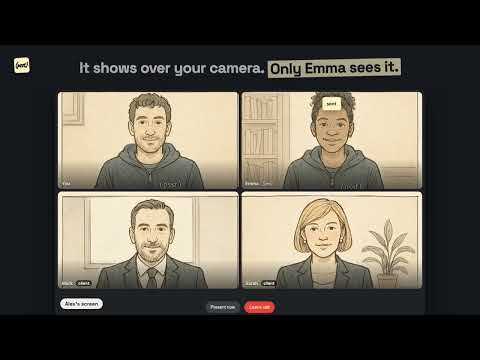
Private messages to a teammate in the middle of a Google Meet call. Nobody else in the call sees them.
Psst: tell a teammate something in the middle of a Google Meet call, without anyone else seeing it. You are on a call with a client and need to give your teammate a heads-up without interrupting: "no price yet: ask about volume first". Psst shows it only to that person, right above your camera, which is where they are already looking. HOW IT WORKS • Install Psst, sign in with your Google account and build your team by inviting people by email (each person is in one team). • In the meeting, a small grey «(psst)» shows up next to the name of each teammate. • Click their tile (or press Alt+P), pick one person or several, type up to 140 characters and press Enter. • Your teammate sees it above your camera for 7 seconds and answers with 👍, 👎 or a reply that quotes your message. You see their 👍 or their reply above their camera. BUILT SO THAT NOBODY ELSE SEES IT • If either of you presents a screen, window or tab from the meeting, Psst hides before the presentation starts, and nobody can write to whoever is presenting. • Panic shortcut Alt+Shift+P: hides everything at once. Use it if you share your screen from another app (Zoom, OBS), which Psst cannot detect. • Messages are drawn only on the recipient's screen: they are not part of your video, recordings or transcripts. • No sounds and no history: after 7 seconds nothing is left. PRIVACY • End-to-end encrypted: the server only relays messages and never stores them, not even encrypted. • Works only on meet.google.com. It does not read the meeting's chat, audio, video or transcripts. • Only teammates from your own team can see you, and nobody can tell which meetings you are in. • Usage metrics without content, names or emails, which you can turn off in Options. The extension does not talk to any third-party service. PRICING • Free during the beta. After that, USD 4.99 per month per team, with unlimited people. Requirements: Chrome 116 or later, on a computer. Meet in the browser (not on a phone). Help: help@psst.team · https://psst.team Acceptable use: Psst is for teams who serve a third party together. It may not be used to get covert help in exams or in interviews where you are expected to act alone. See the terms of service. Psst works with Google Meet but is not a Google product and is not affiliated with Google. Google Meet is a trademark of Google LLC.
0 out of 5No ratings
Details
- Version0.1.4
- UpdatedOctober 25, 2026
- Size336KiB
- Languages3 languages
- DeveloperWebsite
Email
ivan@psst.team - Non-traderThis developer has not identified itself as a trader. For consumers in the European Union, please note that consumer rights do not apply to contracts between you and this developer.
Privacy

Psst — Private messages in Google Meet has disclosed the following information regarding the collection and usage of your data. More detailed information can be found in the developer's privacy policy.
Psst — Private messages in Google Meet handles the following:
This developer declares that your data is
- Not being sold to third parties, outside of the approved use cases
- Not being used or transferred for purposes that are unrelated to the item's core functionality
- Not being used or transferred to determine creditworthiness or for lending purposes
Support
For help with questions, suggestions, or problems, visit the developer's support site