

WebLook

Overview
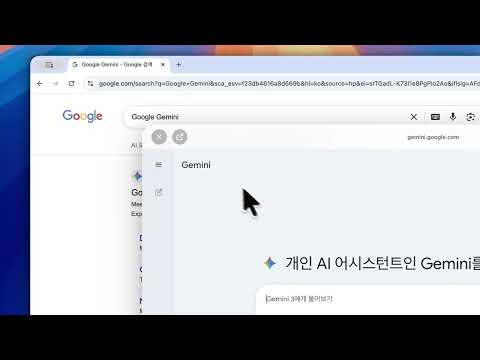
Peek inside any link instantly without leaving your page. Hold Shift and hover to preview links with a clean, adaptive UI.
WebLook: macOS Finder Preview on Chrome "Preview any link instantly with Shift + Hover. Experience the macOS Quick Look vibe directly in your web browser." "Stop the Tab Hell. A new standard for web surfing, WebLook." Are you tired of opening and closing new tabs just to check a link's content? Now, with WebLook, explore every webpage as lightly and stylishly as macOS 'Quick Look'. ✨ Key Features - Instant Peek & Pop: Simply hold the Shift key and hover over a link to preview the content immediately without leaving the page. - Liquid Glass Design: Features a beautiful glassmorphism UI and smooth animations inspired by the latest macOS design language. - In-Popup Browsing: Navigate freely within the preview window—click links and explore without ever opening a new tab. - Privacy First: Pages viewed through WebLook are not recorded in your browser history, keeping your digital footprint clean. - Smart UI: Automatically detects background colors to switch between light and dark modes for optimal button visibility. 🛠 How to Use 1. Hover your mouse over the link you want to check. 2. Press the Shift key to trigger the elegant glass-textured popup. 3. Move your mouse out of the popup or release the key to let it fade away smoothly. ⚠️ Disclaimers This extension is not affiliated with Google or Google Chrome. Google Chrome is a registered trademark of Google, Inc. This extension is not affiliated with Apple or macOS. macOS is a registered trademark of Apple, Inc. Use WebLook by NABELLIAN Developments for a cleaner and more professional browsing experience.
0 out of 5No ratings
Details
- Version1.0.1
- UpdatedApril 7, 2026
- Offered byNABELLIAN
- Size321KiB
- Languages2 languages
- Developer
Email
hello.nabellian@gmail.com - Non-traderThis developer has not identified itself as a trader. For consumers in the European Union, please note that consumer rights do not apply to contracts between you and this developer.
Privacy

This developer declares that your data is
- Not being sold to third parties, outside of the approved use cases
- Not being used or transferred for purposes that are unrelated to the item's core functionality
- Not being used or transferred to determine creditworthiness or for lending purposes
Support
For help with questions, suggestions, or problems, please open this page on your desktop browser