


Overview
Inspect page elements and copy focused HTML/CSS snippets from the current tab.
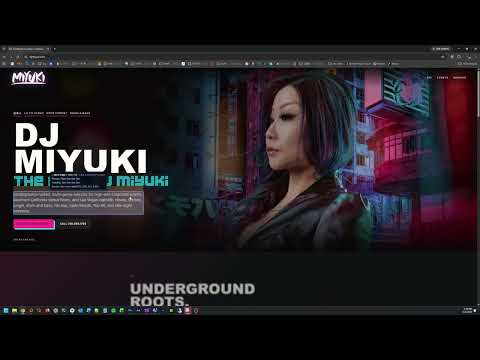
Cisster is a lightweight CSS Spy Mode extension for developers and designers who need to inspect, extract, and reuse page styling quickly. Turn on Spy Mode from the extension popup or with Ctrl+Shift+S, hover over any element on the current page, and Cisster highlights its box model while showing useful element details. Click to open the in-page copy menu and choose the extraction style you need, including HTML, CSS, combined HTML/CSS, scoped component output, tokenized variables, and selector-based snippets. Cisster is built for focused front-end inspection without accounts, telemetry, or background data collection. It only runs on the active tab when you turn Spy Mode on. KEY FEATURES // • Highlight elements directly on the page • Inspect margin, padding, and content areas • Copy HTML, CSS, or combined snippets • Extract cleaner component-oriented CSS • Capture useful pseudo-element styling • Navigate inspected elements with keyboard arrows • Toggle Spy Mode from the popup or Ctrl+Shift+S • No telemetry, login, backend, or stored user data
0 out of 5No ratings
Details
- Version0.1.0
- UpdatedJune 4, 2026
- Size201KiB
- LanguagesEnglish (United States)
- DeveloperNathan Thomas SmithWebsite
1914 E Catalina Ave Santa Ana, CA 92705 USEmail
flashvenomdesign@gmail.comPhone
+1 714-618-7735 - TraderThis developer has identified itself as a trader per the definition from the European Union and committed to only offer products or services that comply with EU laws.
Privacy

This developer declares that your data is
- Not being sold to third parties, outside of the approved use cases
- Not being used or transferred for purposes that are unrelated to the item's core functionality
- Not being used or transferred to determine creditworthiness or for lending purposes
Support
For help with questions, suggestions, or problems, visit the developer's support site