

Volume Master — Volume Booster & Sound Equalizer up to 600%

Overview
Boost any tab's volume up to 600%. Volume booster with per-tab control, bass & voice modes and 5-band equalizer. No data collected.
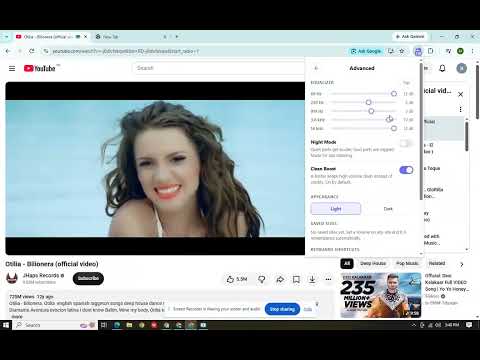
🔊 Volume Master – Volume Booster up to 600% Boost browser audio up to **600%** with Volume Master. Control tab volume, enhance bass, clarify voices, and customize your sound with a built-in equalizer. ✦ KEY FEATURES 🔊 600% Volume Booster – Make quiet videos, music, and audio louder. 🎚️ Per-Tab Volume Control – Set independent volume levels for each tab. 🎙️ Voice & Bass Boost – Enhance speech, dialogue, and low frequencies. 🎛️ 5-Band Equalizer – Customize bass, mids, and treble. 🌙 Night Mode – Balance loud and quiet audio. ✨ Clean Boost Limiter – Help control audio peaks at higher volumes. 💾 Volume Memory – Automatically remember your preferred volume for each website. ⌨️ Keyboard Shortcuts – Adjust volume and mute without opening the popup. ⚡ HOW TO USE 1. Pin Volume Master to your Chrome toolbar. 2. Play audio in any supported tab. 3. Click the extension icon. 4. Adjust the volume slider. 🔒 PRIVACY No account required. No tracking, analytics, or in-extension advertising. Settings are stored locally in your browser. ℹ️ COMPATIBILITY Works with supported audio-playing tabs. DRM-protected services may restrict volume boosting. ♡ FREE TO USE Website: https://volumemasterr.com/
0 out of 5No ratings
Details
- Version1.0.6
- UpdatedNovember 12, 2026
- Size134KiB
- Languages55 languages
- DeveloperWebsite
Email
delihome.n@gmail.com - Non-traderThis developer has not identified itself as a trader. For consumers in the European Union, please note that consumer rights do not apply to contracts between you and this developer.
Privacy

This developer declares that your data is
- Not being sold to third parties, outside of the approved use cases
- Not being used or transferred for purposes that are unrelated to the item's core functionality
- Not being used or transferred to determine creditworthiness or for lending purposes
Support
For help with questions, suggestions, or problems, please open this page on your desktop browser