

Prompt Loader for Suno

Overview
Fill Suno's Create form from your saved prompt files in one click: title, style, exclude styles and lyrics.
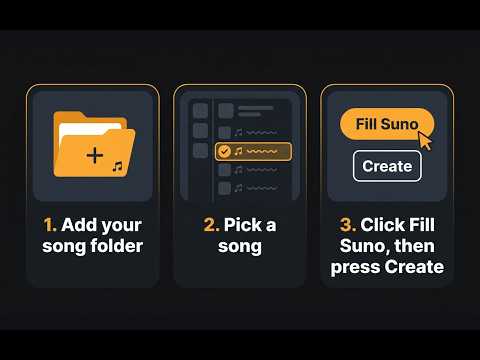
Keep your Suno prompts as files on your computer and stop copying and pasting. Prompt Loader opens in Chrome's side panel on suno.com, lists the prompt files in the folders you choose (newest first), and fills Suno's Create form with one click: title, style, exclude styles, and lyrics. You check it and press Create yourself. It never generates or downloads anything. Pick one subfolder with Show, sort newest first or by file name, and keep backups out of the list by starting a folder name with _. Not for everyone: if you make one song at a time and rarely change it, pasting into Suno is simpler. It's for people who keep many prompts as files, or edit and regenerate often. A prompt file is a Markdown file with a title line and STYLE, NEGATIVE PROMPT, and LYRICS sections. Only STYLE is required. Over-limit fields are flagged before you fill. How it works, sample songs to try it in a minute, and the file format: https://extensions.ridgelineknows.com/prompt-loader Private by design: your files are read on your computer and never uploaded anywhere. Not affiliated with, or endorsed by, Suno.
0 out of 5No ratings
Details
- Version0.1.3
- UpdatedOctober 23, 2026
- Offered byBrian Boyd
- Size23.56KiB
- LanguagesEnglish (United States)
- Developer
Email
google-extensions@RidgelineKnows.com - Non-traderThis developer has not identified itself as a trader. For consumers in the European Union, please note that consumer rights do not apply to contracts between you and this developer.
Privacy

This developer declares that your data is
- Not being sold to third parties, outside of the approved use cases
- Not being used or transferred for purposes that are unrelated to the item's core functionality
- Not being used or transferred to determine creditworthiness or for lending purposes
Support
For help with questions, suggestions, or problems, please open this page on your desktop browser