Item logo image for ChromOverlay

ChromOverlay

Item media 4 (screenshot) for ChromOverlay
Item video thumbnail
Item media 2 (screenshot) for ChromOverlay
Item media 3 (screenshot) for ChromOverlay
Item media 4 (screenshot) for ChromOverlay
Item video thumbnail
Item media 2 (screenshot) for ChromOverlay
Item media 3 (screenshot) for ChromOverlay
Item media 4 (screenshot) for ChromOverlay

Overview

Digitize and analyze chromatography peaks directly from your browser. Calculate Area, Height, and Efficiency (N).

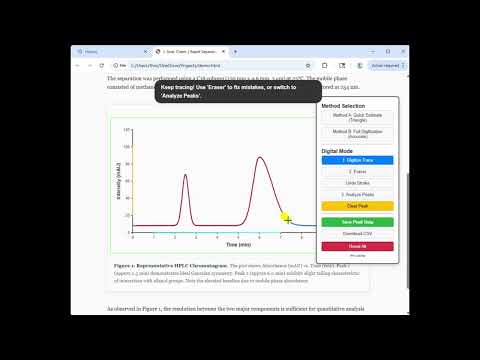
ChromOverlay is the essential utility for analytical chemists who review literature, legacy reports, or vendor applications. It allows you to obtain quantitative data from static images of chromatograms. How it works: 1. Calibrate: Draw a box around the graph to define the Time and Intensity axes. 2. Trace: Use the highlighter to digitize the peak or use the "Quick Triangle" tool for an instant estimate. 3. Analyze: The tool calculates Area, Height, and Efficiency (N). 4. Export: Save your results to CSV. Includes advanced features like manual apex correction and adjustable baselines for precise integration. Works locally—no data leaves your browser.

Details

  • Version
    1.0.1
  • Updated
    February 10, 2026
  • Size
    5.09MiB
  • Languages
    English
  • Developer
    Email
    induanushi@gmail.com
  • Non-trader
    This developer has not identified itself as a trader. For consumers in the European Union, please note that consumer rights do not apply to contracts between you and this developer.

Privacy

Manage extensions and learn how they're being used in your organization

ChromOverlay has disclosed the following information regarding the collection and usage of your data. More detailed information can be found in the developer's privacy policy.

ChromOverlay handles the following:

User activity
Website content

This developer declares that your data is

  • Not being sold to third parties, outside of the approved use cases
  • Not being used or transferred for purposes that are unrelated to the item's core functionality
  • Not being used or transferred to determine creditworthiness or for lending purposes

Related

Pixel Ruler — Measure Pixels, Distance & Element Size on Any Page

0.0

Measure anything on a web page — pixel distances, element sizes, margins & spacing. Color eyedropper. No login, no tracking.

Kulay Colour Picker

0.0

Sample webpage colors, copy HEX/RGB/OKLCH values, and generate palette harmonies.

CalcMagic — a convenient and functional calculator

4.9

A feature-rich calculator extension for Chrome. Perform calculations, view history, and enjoy a user-friendly interface.

Pixel Size Measurer

0.0

Measure pixels, inspect elements, pick colors, detect fonts, check contrast, and annotate screenshots. No paywall, no analytics.

Light MD Viewer

5.0

View and edit Markdown files directly in Chrome with syntax highlighting, mermaid diagrams, and split editor.

Tailchrome

5.0

Access your tailnet from your browser. Run a full Tailscale node per browser profile without affecting system networking.

Chroma - Color Picker & Palette Studio

4.5

Fast, beautiful web color picker & studio. Sample hex codes, build palettes, check WCAG contrast, and export CSS code.

ColorHexa Search Tool

3.8

Full information about any color (schemes, shades, conversion in rgb, hsl, etc.). Eyedropper, Color Picker and Gradient Generator.

Sidebar Calc: Scientific Calculator

4.6

Chrome side panel calculator for quick math and scientific calculations. Use history, copy results, and calculate while browsing.

Raval — Measure & Inspect Web Pages

0.0

Measure, inspect and annotate any webpage: sizes, gaps, fonts, colours and guides. Free and open source.

Text Analyzer – Count Letters & Digits

5.0

Analyze text on any webpage and count letters, digits, zeros, and totals.

Measure It

5.0

Measure It is pixel-perfect page ruler for measuring sizes, distances and positions directly on web pages.

Pixel Ruler — Measure Pixels, Distance & Element Size on Any Page

0.0

Measure anything on a web page — pixel distances, element sizes, margins & spacing. Color eyedropper. No login, no tracking.

Kulay Colour Picker

0.0

Sample webpage colors, copy HEX/RGB/OKLCH values, and generate palette harmonies.

CalcMagic — a convenient and functional calculator

4.9

A feature-rich calculator extension for Chrome. Perform calculations, view history, and enjoy a user-friendly interface.

Pixel Size Measurer

0.0

Measure pixels, inspect elements, pick colors, detect fonts, check contrast, and annotate screenshots. No paywall, no analytics.

Light MD Viewer

5.0

View and edit Markdown files directly in Chrome with syntax highlighting, mermaid diagrams, and split editor.

Tailchrome

5.0

Access your tailnet from your browser. Run a full Tailscale node per browser profile without affecting system networking.

Chroma - Color Picker & Palette Studio

4.5

Fast, beautiful web color picker & studio. Sample hex codes, build palettes, check WCAG contrast, and export CSS code.

ColorHexa Search Tool

3.8

Full information about any color (schemes, shades, conversion in rgb, hsl, etc.). Eyedropper, Color Picker and Gradient Generator.

Google apps