


개요
Extension for automating chromium browser, Create project -> Record -> Edit Automation -> Manage -> Play (MV3)
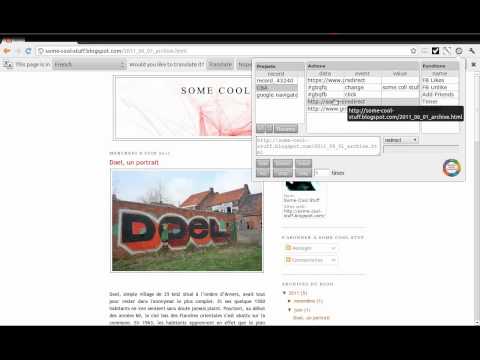
1. CBA gives ability to setup step-by-step code injections from the Extensions popup interface. 2. Record user interactions while navigating web pages (filling forms, clicking buttons, hyperlinks and smart algorithms for DOM element path calculations). 3. Save Projects in your browser's local storage. 4. Step by step code injection. 5. Import, export and share projects with collaborators. 6. Extensions ready functions now available. 7. Implement useful Extension placeholders. 8. Write your own code to access the web page's DOM. 9. And much much more... Github: https://github.com/browser-automation/cba Issues and feature requests: https://github.com/browser-automation/cba/issues Privacy Policy: https://chrome-automation.com/privacy Contact email: saroyanm@gmail.com
5점 만점에 3.4점평점 217개
세부정보
개인정보 보호

Chromium browser automation에서 데이터 수집 및 사용과 관련하여 다음 정보를 공개했습니다. 더 자세한 정보는 개발자의 privacy policy을 참고하세요.
Chromium browser automation 항목은 다음을 처리합니다.
개발자가 사용자 데이터에 관해 다음과 같이 선언했습니다
- 승인된 사용 사례를 제외하고 서드 파티에 판매하지 않음
- 항목의 핵심 기능과 관련 없는 목적으로 사용하거나 전송하지 않음
- 신용도 판단 또는 대출 목적으로 사용하거나 전송하지 않음
지원
질문, 제안 또는 문제와 관련하여 도움이 필요하면 데스크톱 브라우저에서 이 페이지를 여세요.