


Overview
Guided web assistance for Claude Code and Codex CLI
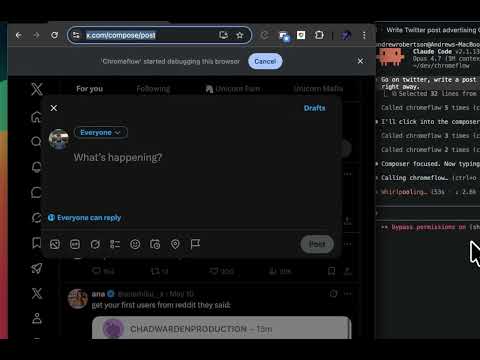
Chromeflow: guided browser actions for Claude Code and Codex CLI Chromeflow connects your coding agent (Claude Code or OpenAI's Codex CLI) to your real Chrome browser. When the agent needs to set up a third party service, grab API keys, configure billing, or do anything in a web UI, Chromeflow drives it visually in the browser you're already logged into. Built on 500+ hours of real automations This started as a personal tool for paid task work and grew from there. 500+ hours across billing dashboards, OAuth handshakes, multi step forms, React SPAs, and aggressively anti-bot platforms. Every weird failure mode I hit got patched. The result is a Chrome extension that works on complex web pages and doesn't trip anti-automation checks. What that means in practice: - Mouse and keyboard events dispatched via CDP with isTrusted=true. No Playwright style synthetic events that anti-bot frameworks reject on sight. - Curved mouse trajectories with ease-out timing, randomized landing points within the central 60% of the target, settle-hover micro-tremor, and humanized press/release pauses. Behavioral fingerprinters that score on trajectory smoothness (LinkedIn, Akamai) see real movement, not teleport clicks. - PointerEvent isPrimary=true alongside MouseEvent on every dispatch, plus a non-zero pressure value via force. Stricter Web Components (Reddit's faceplate-textarea-input, X's tweet composer) that check event shape in addition to isTrusted accept the click. - Closed shadow DOM piercing across every primitive (find_text, click_element, fill_input, fill_form, set_file_input, wait_for, scroll_to_element, get_page_text, get_page_html, get_form_fields, react_call_prop). Radix, Stencil, Lit, and other modern web component frameworks are not blind spots. - WebRTC IP leak suppression, visibility API patching, and other stealth defaults applied at document_start in the page's MAIN world. - A 1500ms post-click activity probe that catches silent rejections (DOM mutations, focus change, URL change, value/checked change, alert/toast/modal, shadow-pierce visible element growth) and falls back through three tiers: CDP synthesizeTapGesture, content script DOM .click(), and React fiber onClick invocation on opt-in. - Anti-bot block page detection on every open_page and fetch_url. The response tells you exactly what blocked you: "Cloudflare challenge" / "Akamai block" / "PerimeterX captcha" / "DataDome captcha" / "Imperva/Incapsula block" / "Kasada challenge" / "Sucuri firewall block", so the agent doesn't waste a debugging cycle parsing a block page as real content. - Auto-dismiss of Chrome's "Are you sure you want to leave?" beforeunload dialog on open_page, close_tab, and close_other_tabs, with a dismissed_beforeunload field in the response so the agent knows there was unsaved content. - Real Chrome, real sessions, real cookies, real fingerprint. No fresh Puppeteer profile for the page to flag. Validated platforms Every release runs end to end procedures against live targets. Live status, dates, and per-platform competitor comparisons at chromeflow.run/validated. Currently passing: Reddit (composer expand + comment typing + flair picker), X / Twitter (tweet input), LinkedIn (feed composer), Facebook (feed composer), Instagram (React input), Radix portal dialog scoping, Stencil closed shadow piercing, TipTap / ProseMirror typing with silent drop auto-recovery. Why your real Chrome Tools like Playwright and Browser Use launch a fresh, empty browser. No cookies, no sessions, no 2FA. Chromeflow runs in your actual Chrome, where you're already signed into LinkedIn, AWS, Supabase, and everything else. The agent automates what it can and pauses for the parts that genuinely need you. What it does - Highlights what to click with on-screen callouts and a dark-mask focus overlay - Clicks buttons, fills forms, uploads files, switches tabs, navigates pages - Reads page content as rendered, including React controlled inputs, contenteditable editors, same-origin iframes, and open AND closed shadow roots - Captures API keys and secrets and writes them straight to your .env - Clicks at viewport coordinates for cross-origin iframes that can't be entered by DOM lookup - Pauses only for steps that genuinely need you: passwords, payment details, 2FA codes, personal choices How it works Chromeflow is two halves: - This Chrome extension acts on the active tab (highlights, clicks, fills, uploads) - A plugin for your agent (Claude Code or Codex CLI) gives it an MCP server with 30 browser tools and a usage skill so it knows when and how to reach for them The agent drives the flow end to end. You watch and step in when something needs a human. Run Claude Code and Codex side by side in different Chrome windows; the popup shows which session is which with a host badge on each row. Things the agent can do with Chromeflow - "Set up payments, create a product with monthly and annual pricing, write the price IDs to .env" - "Open Supabase and grab my project's anon key and service role key" - "Configure SendGrid webhooks for this app and verify the test event lands" - "Fill out this 40 field onboarding form using the data in customer.json" - "Watch the Vercel deploy and tell me when it finishes, open the logs if it fails" - "Pre-fill a Reddit comment with this body, then highlight the submit so I can click it" - "Read the inputs inside this Stencil web component (closed shadow) and tell me which fields are empty" Setup 1. Install the extension. Click Add to Chrome above. 2. Install the plugin in your agent (one time, machine-wide). Claude Code: /plugin marketplace add https://gitlab.com/NeoDrew/chromeflow.git /plugin install chromeflow Codex CLI: codex plugin marketplace add https://gitlab.com/NeoDrew/chromeflow.git /plugins (then select chromeflow, install) 3. Restart the agent. That's it. The plugin registers the MCP server and ships the usage skill, no per-project setup. The agent reaches for Chromeflow automatically whenever a task needs browser interaction. What's new in 10.21 - Button Highlighting overhall - Reddit Submission, Flair, Etc work - Activity Box in top right Requirements - Google Chrome - Claude Code (https://claude.com/claude-code) or Codex CLI (https://developers.openai.com/codex/cli) - Node.js 22
0 out of 5No ratings
Details
- Version0.13.12
- UpdatedSeptember 14, 2026
- Size104KiB
- LanguagesEnglish
- DeveloperWebsite
Email
AndrewMaxwellRobertson@gmail.com - Non-traderThis developer has not identified itself as a trader. For consumers in the European Union, please note that consumer rights do not apply to contracts between you and this developer.
Privacy

This developer declares that your data is
- Not being sold to third parties, outside of the approved use cases
- Not being used or transferred for purposes that are unrelated to the item's core functionality
- Not being used or transferred to determine creditworthiness or for lending purposes
Support
For help with questions, suggestions, or problems, visit the developer's support site