Item logo image for Chrome to Code

Chrome to Code

5.0(

1 rating

)
Item video thumbnail

Overview

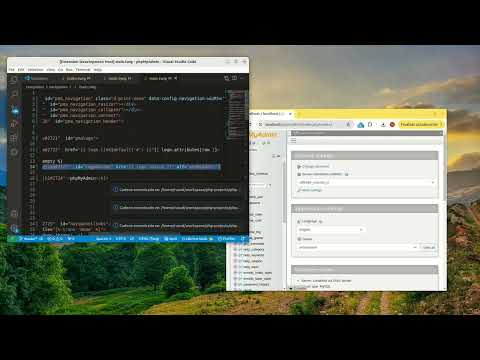
Chrome 2 Code lets you select DOM elements and find their definitions in the source code of your web application in VS Code.

Chrome to Code (C2C) allows you to communicate VSCode with Google Chrome browser while developing web applications. Currently, its main feature is quite useful, especially when you are new to an existing project, or when you are working on legacy projects and you don't remember much about what they were about. You will also need to install the code2chrome extension in VS Code.

Details

  • Version
    1.0.1
  • Updated
    September 5, 2025
  • Offered by
    mockplug.dev
  • Size
    106KiB
  • Languages
    English
  • Developer
    Email
    mockplug.dev@gmail.com
  • Non-trader
    This developer has not identified itself as a trader. For consumers in the European Union, please note that consumer rights do not apply to contracts between you and this developer.

Privacy

The developer has disclosed that it will not collect or use your data.

This developer declares that your data is

  • Not being sold to third parties, outside of the approved use cases
  • Not being used or transferred for purposes that are unrelated to the item's core functionality
  • Not being used or transferred to determine creditworthiness or for lending purposes

Related

click-to-react-component

3.4

Option+Click React components in your browser to instantly open the source in VS Code

New Chrome extension source viewer

5.0

View source code of Chrome extensions, Firefox addons or Opera extensions (crx/nex/xpi) from the Chrome web store and elsewhere.

Open in VSCode

5.0

Open Github and Gitlab links in VSCode

Chrome Extension Source Viewer

5.0

Use Chrome Extension Source Viewer to check all extensions' source code and analyze extension stats directly from your browser.

Chrome extension source viewer

4.6

View source code of Chrome extensions, Firefox addons or Opera extensions (crx/nex/xpi) from the Chrome web store and elsewhere.

HTML To Elementor

4.0

Chrome extension to help convert html web page to elementor widget

Copy HTML with CSS

0.0

Adds a DevTools Elements sidebar that lets you copy the selected element's HTML along with its computed CSS as inline styles.

Web Source Extractor

1.0

Extract and download complete source code from any webpage including HTML, CSS, JS, and assets as a ZIP file

Chrome Color picker

0.0

A Chrome Extension that help to pick the color from web site.

Open Rails Partial

0.0

Chrome extension that supports opening Rails partials found on the page in VS Code

URL Encode & Decode

0.0

Easily encode and decode URLs directly from your browser.

TypeScript Console

3.0

Run and debug TypeScript code in the Browser DevTools.

click-to-react-component

3.4

Option+Click React components in your browser to instantly open the source in VS Code

New Chrome extension source viewer

5.0

View source code of Chrome extensions, Firefox addons or Opera extensions (crx/nex/xpi) from the Chrome web store and elsewhere.

Open in VSCode

5.0

Open Github and Gitlab links in VSCode

Chrome Extension Source Viewer

5.0

Use Chrome Extension Source Viewer to check all extensions' source code and analyze extension stats directly from your browser.

Chrome extension source viewer

4.6

View source code of Chrome extensions, Firefox addons or Opera extensions (crx/nex/xpi) from the Chrome web store and elsewhere.

HTML To Elementor

4.0

Chrome extension to help convert html web page to elementor widget

Copy HTML with CSS

0.0

Adds a DevTools Elements sidebar that lets you copy the selected element's HTML along with its computed CSS as inline styles.

Web Source Extractor

1.0

Extract and download complete source code from any webpage including HTML, CSS, JS, and assets as a ZIP file

Google apps