


Overview
Track student Chromebook screen time.
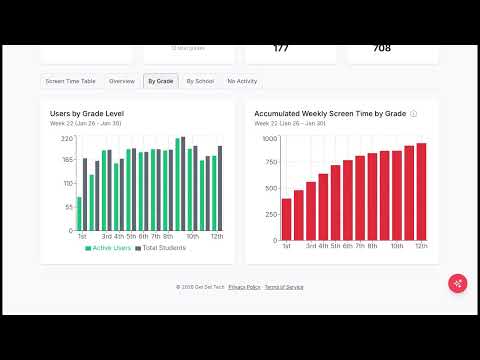
Chrome Clock is a simple, privacy-first tool that helps schools track Chromebook screen time and understand device usage across students, grades, and time of day. Designed specifically for K–12 environments, Chrome Clock gives administrators clear, actionable data without monitoring content or invading student privacy. What Chrome Clock Does Chrome Clock tracks how long a Chromebook is actively in use throughout the day. When a student opens their device, the clock starts. When the device is no longer active, tracking stops. All data is automatically captured and displayed in a clean, easy-to-read dashboard. Key Features Track Chromebook Screen Time See exactly how many minutes students are using their Chromebooks each day. Usage by Hour, Grade, and Student Understand patterns across your school with breakdowns by time of day, grade level, and individual users. Heat Map Visualization Quickly identify peak usage times and trends with a built-in heat map. Identify Low or No Usage Spot students or groups with little to no Chromebook activity. Built for Google Workspace for Education Works seamlessly in school environments using managed Chromebooks. Privacy First Chrome Clock does not track what students are doing. It only tracks how long devices are being used. No browsing history. No content monitoring. No invasive tracking. Why Schools Use Chrome Clock Schools are making decisions about technology use every day, but most lack clear data. Chrome Clock provides real usage insights so schools can: • Make informed screen time policies • Understand how devices are actually being used • Support balanced technology use • Identify gaps in access or engagement Use Cases • Track student screen time on Chromebooks • Measure daily Chromebook usage across a district • Analyze device usage trends by grade level • Support conversations around screen time and learning Get Started Install Chrome Clock and start seeing real Chromebook usage data in minutes.
0 out of 5No ratings
Details
- Version1.26
- UpdatedApril 22, 2026
- Size93.19KiB
- LanguagesEnglish
- Developer
- Non-traderThis developer has not identified itself as a trader. For consumers in the European Union, please note that consumer rights do not apply to contracts between you and this developer.
Privacy

Chrome Clock has disclosed the following information regarding the collection and usage of your data. More detailed information can be found in the developer's privacy policy.
Chrome Clock handles the following:
This developer declares that your data is
- Not being sold to third parties, outside of the approved use cases
- Not being used or transferred for purposes that are unrelated to the item's core functionality
- Not being used or transferred to determine creditworthiness or for lending purposes
Support
For help with questions, suggestions, or problems, please open this page on your desktop browser