


Overview
Five tools in one panel: QR codes, Mexico's official exchange rate, your public IP, world clocks, and images in a new tab.
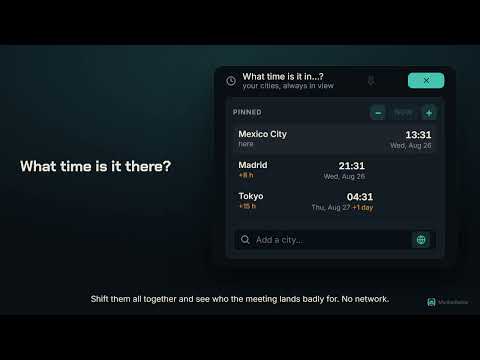
chino ext is a small panel of tools I kept needing and my browser didn't have. Each one replaces a website you'd otherwise have to open — usually one covered in ads, asking for your data to do arithmetic. No setup, no account, no clutter. WHAT'S INSIDE • QR code for any link For the page you're on, or right-click any link. The code is drawn on your own machine by a library inside the extension: the address never reaches a server, ours or anyone else's. It opens in its own window, so it stays put while you get your phone out. Optionally strips tracking parameters first — off by default, and it always shows you exactly which ones it removed. • USD ⇄ MXN converter Uses the official FIX exchange rate from Banxico, the one Mexico's central bank sets every business day. Fetched once a day and cached, so it's instant after that. Type on either side and the other updates by itself. • What's my IP Your public IP, the city you connect from, your provider and your timezone — without leaving the browser or trusting a random website. • What time is it in…? A small world clock. Search among the timezones your browser already ships with — no list is downloaded, nothing is requested. Pin the cities you care about, and use the buttons to shift them all together to see who a meeting lands badly for. • Open any image in a new tab Right-click an image and it opens in the next tab, at full size. No download, no extra window, no losing your place. HOW IT'S BUILT • Light theme, dark theme, or whatever your system uses. • English and Spanish. • Pin the tools you use most so they're already open when the panel opens. • No content scripts at all: the extension never reads or changes the pages you visit, and installing it shows no website-access warning. • No analytics, no ads, no tracking. Only two buttons ever reach the network — the IP lookup and the exchange rate — and both are explained in the privacy policy.
0 out of 5No ratings
Details
- Version2.4
- UpdatedAugust 27, 2026
- Size152KiB
- Languages2 languages
- DeveloperWebsite
Email
mictlan.raider@gmail.com - Non-traderThis developer has not identified itself as a trader. For consumers in the European Union, please note that consumer rights do not apply to contracts between you and this developer.
Privacy

This developer declares that your data is
- Not being sold to third parties, outside of the approved use cases
- Not being used or transferred for purposes that are unrelated to the item's core functionality
- Not being used or transferred to determine creditworthiness or for lending purposes