

Chinese Console Popup Dictionary
17 個評分
)
總覽
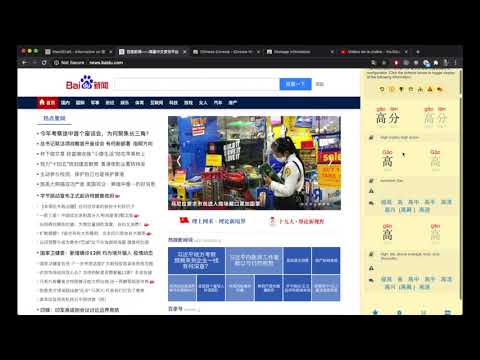
Hover over Chinese characters for definitions, images, examples, visualizations, radicals, frequencies, HSK info, & more
Chinese Console - Popup Chinese-English Dictionary is a tool to help you read, explore, and better understand the Chinese characters in any web page on the web. By hovering over words and characters you are interested in, detailed information will be shown in the console area. The information that Chinese Console shows includes: - Mandarin Chinese-English Dictionary definitions - Simplified and Traditional characters - Pinyin tone pronunciation - Animated stroke order digrams - A list of example words that a character occurs in - A list of similar characters (eg 大犬六穴太尢) - Character radical composition information - View images associated with the searched word - Colorize all characters on the page by frequency in the language - Colorize all characters on the page by frequency on the page - A flexible layout (display in corners, or on left or right side - Floatable mode, where a box of information follows your cursor - Colorized themes, including light mode, dark mode, "morning", "ocean", "forest" & "candy" - Minimized mode - Navigate a history of searched words - Search by typing interface - HSK level information - Configurable to display only info you want - Global and Site-specific configuration - Configurable hot-key (alt, ctl...) to activate console You can color the characters on the page according to how common (green) or uncommon (red) the character is so you know how "important" the character is. Using this "distribution frequency" you can colorize characters by frequency in the language as a whole (based on a Chinese web corpus), or the page being viewed. Another common way to know how "important" or "difficult" a character is is by using the HSK level (汉语水平考试 (Hanyu Shuiping Kaoshi ), Chinese Proficiency Test administered by the Hanban. Chinese Console Characters are formed by radicals, and Chinese Console decomposes characters into radicals for better understanding. At the touch of a button you can view images associated with the word you've looked up to get a better idea of what that word means on the web. You can also customize where the console appears on the page so that your content is always easily viewable. If you don't need to display some of this information the console can be configured to show only what you need. You can also maintain a separate configuration (position, and info display) both globally (all pages) and per-site if needed. The console uses a 'hot-key' to activate it's searching, to stay out of the way of normal page interactions. This key is configurable by you in a variety of ways for both Mac and PC users. ROADMAP - Integrate Extension with a website backend so users can track their own words and pages. CHANGELOG Version 1.4.2 - Added animated stroke order diagrams for characters Version 1.4.1 - Added colored theme support Version 1.4.0 - Character information is now shown for sub-words and all characters. In previous version results for 共同体 would only show info for 共同体 and 共. In version 1.4 results will show 共同体, 共同, 共,同 and 体. - A link to donate to support the project is now provided. - Long words (5 chars or more) now show in smaller text, to prevent overlapping display.
4.3 分 (滿分 5 分)17 個評分
詳細資料
- 版本1.5.1
- 已更新2024年12月29日
- 提供者pixelearth.net
- 大小7.53MiB
- 語言English
- 開發人員
電子郵件
pixelterra@gmail.com - 非交易商這位開發人員並未表明自己是交易商。歐盟地區的消費者請注意,消費者權利不適用於你和這位開發人員之間簽訂的合約。
隱私權

這位開發者就你的資料做出下列聲明:
- 除經核准的用途外,不會將你的資料販售給第三方
- 不會基於與商品核心功能無關的目的,使用或轉移資料
- 不會為了確認信用度或基於貸款目的,使用或轉移資料
支援
如有疑問或建議,請使用電腦版瀏覽器開啟這個頁面