

chessray
1 rating
)
Overview
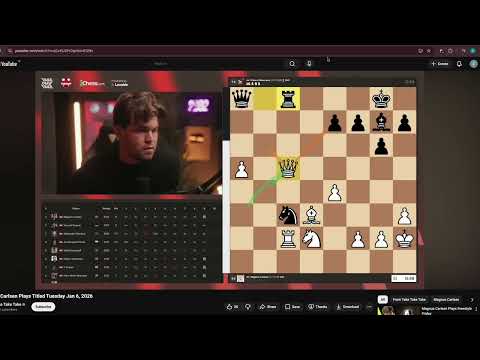
Chess companion that draws and updates top moves + an eval bar on any chess video or stream as it plays. No manual scans.
chessray is a chess companion for streams, videos, replays, screenshots, and PDFs. It watches the chess board in your tab and draws Stockfish's best moves directly on top of it — arrows on the source/destination squares and an evaluation bar down one side. How to use it (step by step): 1. Open a tab that shows a chess board — a chess YouTube video (e.g. agadmator, GothamChess), a Twitch chess stream, a replay/study page, a chess PDF, or a screenshot. 2. Click the chessray toolbar icon (or press Alt+Shift+C). A red ● badge appears on the icon to show capture is running. 3. Within about a second, top-move arrows and an evaluation bar paint directly on the board. The overlay keeps updating on its own as the position changes — there is no Scan button and no manual step. 4. Click the toolbar icon again (or press Alt+Shift+C) to stop. The badge clears and the overlay disappears. 5. For the detailed analysis view (evaluation, principal variation, settings), open the side panel: right-click the chessray toolbar icon and choose "Open side panel". Note: capture is intentionally refused on chess.com and lichess.org (anti-cheat compliance). On those hosts the toolbar icon flashes a red "OFF" badge for about 2 seconds and nothing is captured. On a page with no visible chess board, capture still starts (red ● badge) but there is nothing for the overlay to draw on. It's built for content you watch, not games you play: • YouTube chess channels — agadmator, GothamChess, Hanging Pawns, Eric Rosen • Twitch chess streams — Hikaru, BotezLive, chessbrah • Replays and study pages on chess platforms • Chess books open as PDFs in the browser • Screenshots and image viewers Features: • Live tracking — as the chess board on screen changes (next move in the video, scrubbing back, a new puzzle), chessray re-analyzes within ~1 second. • Color-coded top-move arrows — the engine's best moves drawn directly on the source/destination squares, color-coded so you can tell the first choice from second / third options at a glance. • Live evaluation bar — numeric eval painted alongside the board, updated continuously as moves happen. • Auto last-move + turn detection — chessray finds the highlighted squares the chess UI draws after each move and uses them to infer both the last move played AND whose turn it is. A manual board-flip toggle in the side panel is there as a fallback when auto-orientation gets it wrong. • Variation preview — click any top-move arrow and the on-page board is replaced with a virtual board that plays through the engine's principal variation move-by-move. One click returns to the live board. • Adjustable overlay — change arrow size, change overlay opacity, or hide move hints entirely. • Works on any site — pure pixel-based recognition (YOLOv11), no DOM scraping, no site-specific integration. Streams, replays, PDFs, screenshots all work the same way. • Stockfish 18 Lite (WASM) — iterative deepening + multi-PV, all bundled and running on-device. No network calls. • Side panel with detailed analysis (reachable via right-click on the toolbar icon → Open side panel). • Keyboard shortcut to start/stop capture — default Alt+Shift+C (rebindable at chrome://extensions/shortcuts). How it's different from scan-on-demand extensions: no Scan button, no popup window, no jumping to an external analysis page. The overlay paints in place on the captured tab and updates continuously as moves happen. One click on the toolbar (or Alt+Shift+C — the default shortcut, rebindable at chrome://extensions/shortcuts) starts it; another click stops it. For the detailed analysis view — evaluation, principal variation, settings — open Chrome's side panel by right-clicking the toolbar icon and choosing "Open side panel." Everything runs locally on your computer. No account, no sign-up, no data leaves your device. The Stockfish 18 Lite engine, the YOLOv11 board-recognition model, and the PaddleOCR orientation model are all bundled with the extension and load from the local extension bundle. No network calls during analysis. chessray does not run on chess.com or lichess.org. Both sites have active anti-cheat policies against engine-assisted play; the on-page overlay is excluded from those hosts at the manifest level and the service worker hard-refuses to start tab capture there from every entry point (toolbar, keyboard shortcut, context menu, side-panel CTA). chessray is built for streams, videos, and study material, not live play on those platforms. Privacy: chessray does not transmit pixels, recognized positions, evaluations, or any other data off your device. Full privacy policy: https://chessray.org/privacy Bugs, feature requests, or anything else — reach out at contact@chessray.org or open an issue at https://github.com/chessraygg/chessray/issues. Open source under GPL-3.0: https://github.com/chessraygg/chessray
5 out of 51 rating
Details
- Version0.2.93
- UpdatedMay 29, 2026
- Offered bychessray.org
- Size116MiB
- LanguagesEnglish
- Developer
Email
contact@chessray.org - Non-traderThis developer has not identified itself as a trader. For consumers in the European Union, please note that consumer rights do not apply to contracts between you and this developer.
Privacy

chessray has disclosed the following information regarding the collection and usage of your data. More detailed information can be found in the developer's privacy policy.
chessray handles the following:
This developer declares that your data is
- Not being sold to third parties, outside of the approved use cases
- Not being used or transferred for purposes that are unrelated to the item's core functionality
- Not being used or transferred to determine creditworthiness or for lending purposes
Support
For help with questions, suggestions, or problems, visit the developer's support site