

Chess Video Position Explorer

Overview
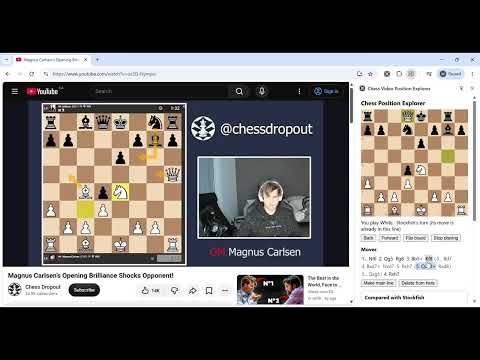
Screenshot any chess board, then explore it: try your own moves, branch into variations, and play against Stockfish. All local.
Ever watch a chess game and wonder why they played that move, or why the move you had in mind wouldn't work? The best way to find out is to try it yourself. Chess Position Explorer turns any chess board on your screen into a position you can explore. Screenshot a video, a website, an article or a puzzle, and the board is read into an editor in seconds. From there, test your own ideas until your question is answered, and you won't ever have to skip it because it's too tedious to set up. EXPLORE IN BRANCHES, NOT JUST ONE LINE Found two moves that both look good? Wondering why Stockfish played one move and not another? Try them all. Every idea becomes its own branch, and the extension keeps track of every branch and position for you. Keep as many variations as you like, switch between them in one click, and make any of them the main line. You spend your time thinking about chess, not managing the board. PLAY IT YOUR WAY • Play both sides yourself, to test your own reasoning. • Play against Stockfish, to see how a strong engine punishes or answers your idea. • Or mix the two: switch between playing yourself and playing Stockfish at any point, in any branch. Stockfish analyses every position as you go, compares your move with its own choice, and shows you its best line. HOW IT WORKS 1. Click the toolbar icon to open the side panel, then click Capture tab. 2. The board is found and the pieces are read. If there's more than one board, crop around the one you want. 3. Check the position and choose whose turn it is (a screenshot can't show that), then confirm. 4. Explore. You can also set up a position by hand or paste a FEN, and copy the FEN of any position. SIMPLE, LIGHTWEIGHT, PRIVATE A small side panel with simple controls, built around one goal: helping you learn by experimenting. Everything runs in your browser, including board detection, piece recognition and the Stockfish engine. Nothing is uploaded and nothing is tracked, and the extension only sees a tab when you click its icon and capture it. GOOD TO KNOW • Works best with a clear, fully visible board. Always check the recognized position before confirming, since unusual piece styles can be misread. • Castling rights and en passant can't be seen in a screenshot either: they're filled in as labelled, editable defaults. Free and open source (GPL-3.0): https://github.com/williamkmdev/chess-extension
0 out of 5No ratings
Details
- Version0.1.0
- UpdatedNovember 21, 2026
- Size5.11MiB
- LanguagesEnglish
- Developer
Email
william.km.dev@gmail.com - Non-traderThis developer has not identified itself as a trader. For consumers in the European Union, please note that consumer rights do not apply to contracts between you and this developer.
Privacy

This developer declares that your data is
- Not being sold to third parties, outside of the approved use cases
- Not being used or transferred for purposes that are unrelated to the item's core functionality
- Not being used or transferred to determine creditworthiness or for lending purposes