


Overview
Extract recipes from YouTube cooking videos into structured recipe cards.
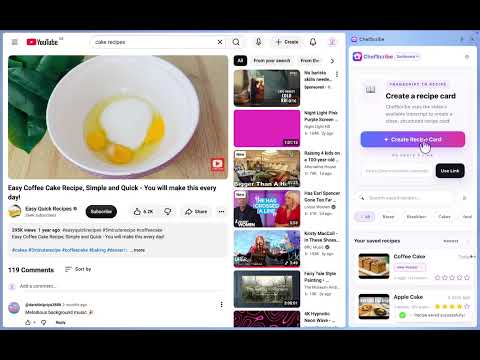
Stop fighting the pause button. Start cooking smarter. 👩🍳 ChefScribe turns YouTube cooking videos into clear, practical recipe cards—with ingredients, step-by-step instructions, adjustable servings and estimated nutrition. Extract recipes with the ChefScribe Chrome extension, organise your collection and plan meals in the web app, then open your saved recipes on your phone or tablet when you’re ready to cook. The Chrome extension and web app are available now. A dedicated iPhone app is coming soon. LESS PAUSING. MORE COOKING. Skip the constant rewinding, scribbled notes and searches through video descriptions. ChefScribe brings the key recipe details together in one easy-to-follow card, while keeping a direct link to the original YouTube video. With ChefScribe, you can: • Extract ingredient lists and cooking instructions from YouTube videos • Adjust servings and automatically recalculate ingredient quantities • View estimated nutrition per serving • Save recipes to your personal recipe library • Organise your collection with folders, tags and star ratings • Copy ingredients for your shopping list • Translate extracted recipes into English • Plan meals using the ChefScribe web app • Open saved recipes across your devices through the web app • Return to the original video whenever you need the full tutorial HOW IT WORKS 1. Open a cooking video on YouTube. 2. Click the ChefScribe Chrome extension. 3. Press “Get Recipe”. 4. ChefScribe creates a recipe card with ingredients, instructions, servings and estimated nutrition. 5. Your recipe is saved automatically, ready to open again when you want to cook. BUILD YOUR OWN RECIPE LIBRARY Found something delicious? Give it a home beyond your YouTube history. Save your favourite recipes, sort them into folders, add useful tags and rate the dishes you’ve tried. Build a collection you can return to week after week. MAKE EVERY RECIPE FIT YOUR TABLE Cooking for yourself, the family or a few extra guests? Change the number of servings and ChefScribe automatically recalculates ingredient quantities, saving you the mental maths while you cook. EXPLORE RECIPES IN OTHER LANGUAGES ChefScribe can translate extracted ingredients and instructions into English, making cooking videos from creators around the world easier to follow. PLAN YOUR MEALS IN THE WEB APP Take your saved recipes a step further with the ChefScribe meal planner. Organise meals for the week and keep your recipe collection close at hand. From finding something tempting on YouTube to deciding what’s for dinner, ChefScribe helps you put those saved recipes to use. FROM YOUR COMPUTER TO YOUR KITCHEN Extract a recipe while browsing YouTube on your computer, then open the ChefScribe web app on your phone or tablet when it’s time to cook. Your saved recipes are available through your ChefScribe account, so you can leave the laptop behind and take the instructions into the kitchen. A dedicated ChefScribe iPhone app is coming soon. KEEP THE ORIGINAL CREATOR CLOSE Every extracted recipe includes a link back to its original YouTube video. Return to the creator’s full tutorial for demonstrations, techniques and tips whenever you need them. FREE TO TRY ChefScribe includes 6 free recipe extractions per month. Try turning your favourite cooking videos into useful recipe cards before deciding whether to upgrade. Install ChefScribe and turn “I’d love to make that” into tonight’s dinner. 🍴
0 out of 5No ratings
Details
- Version1.0.10
- UpdatedSeptember 21, 2026
- FeaturesOffers in-app purchases
- Size276KiB
- LanguagesEnglish
- DeveloperMiss Claire BroxupWebsite
48 Ferney Lee Road Todmorden OL14 5NR GBEmail
contact@chefscribe.comPhone
+44 7773 401877 - TraderThis developer has identified itself as a trader per the definition from the European Union and committed to only offer products or services that comply with EU laws.
Privacy

ChefScribe has disclosed the following information regarding the collection and usage of your data. More detailed information can be found in the developer's privacy policy.
ChefScribe handles the following:
This developer declares that your data is
- Not being sold to third parties, outside of the approved use cases
- Not being used or transferred for purposes that are unrelated to the item's core functionality
- Not being used or transferred to determine creditworthiness or for lending purposes
Support
For help with questions, suggestions, or problems, visit the developer's support site