

ChatGPT Table of Contents - ChatTOC

Overview
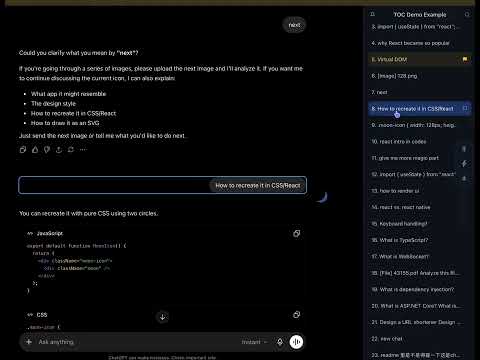
Add a table of contents, prompt navigator, and MyPrompts sidebar to long ChatGPT conversations.
ChatGPT Table of Contents - ChatTOC adds a clean table of contents and prompt navigator sidebar to ChatGPT conversations. It helps you navigate long ChatGPT chats without endless scrolling. Your user prompts are automatically detected and shown as clickable outline items, so you can quickly jump back to earlier questions, sections, and useful parts of the conversation. Features: - ChatGPT table of contents sidebar - Automatically detects user prompts - Click any prompt to jump to that part of the conversation - Sub-navigation for browsing long conversations - MyPrompts for saving, managing, and reusing useful prompts - Right-click a prompt to save it to MyPrompts - Type # or // to insert saved prompts - Search and refresh the conversation outline - Toggle sidebar visibility - Toolbar popup with quick usage tips - Works on chatgpt.com and chat.openai.com Privacy: - No login required - No tracking - No data collection - Your prompts stay in your browser
0 out of 5No ratings
Details
- Version1.4.4
- UpdatedJune 23, 2026
- Offered byLeo
- Size54.96KiB
- LanguagesEnglish
- Developer
Email
geneleoc@gmail.com - Non-traderThis developer has not identified itself as a trader. For consumers in the European Union, please note that consumer rights do not apply to contracts between you and this developer.
Privacy

This developer declares that your data is
- Not being sold to third parties, outside of the approved use cases
- Not being used or transferred for purposes that are unrelated to the item's core functionality
- Not being used or transferred to determine creditworthiness or for lending purposes
Support
For help with questions, suggestions, or problems, visit the developer's support site