

ChatSheet – Export WA Group Contacts & Chat Backup for WhatsApp

Overview
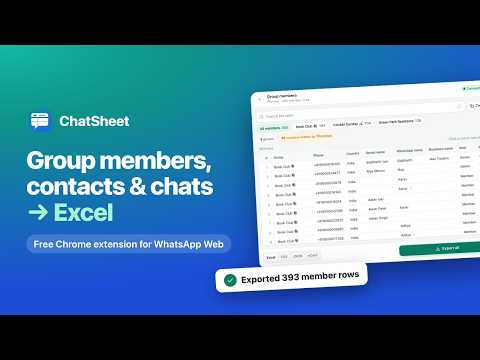
Export group members, contacts and chats from WhatsApp Web to Excel, CSV or vCard. Free, no hidden charges or export limits.
ChatSheet lets you export WhatsApp contacts, group members, chats and messages from WhatsApp Web to Excel (.xlsx), CSV, JSON or vCard, and save a chat backup as a readable HTML file. Handy for anyone who runs WA groups, communities or a small business. Free, with no hidden charges, no export limits and no sign-up. Everything happens in your browser. WHAT YOU CAN EXPORT • Group members: one group or many. Everyone, admins only, or people saved or not saved in your phone. One row per person across groups, or a sheet per group in Excel. • Groups list: size, admins, your role, created date, settings, description, and invite links for groups you admin. • Contacts: saved, not saved or businesses, with duplicates merged by number. • Chats: last message time, unread, archived, pinned, muted and labels. • Chat messages: one chat, several or all at once, with a date range and how many per chat. Optionally keep photos, videos, voice notes and documents in a folder next to the file. • Channels you follow or run. • Communities and their groups. • Labels (Business accounts) and the chats in each. • Join requests for groups you admin. • Blocked numbers. Lists of people get a Country column and filter, from each number's country code. WHY CHATSHEET • Free, with no hidden charges or export limits. • Preview before saving: search, sort by any column, then export every row or just the ones shown, or copy them into Google Sheets. • All chats at once, as a spreadsheet or an HTML backup that reads like a chat and opens offline. • Private: it works on your computer, and nothing is uploaded. • Export history, light and dark theme, 50+ languages, and a full tab or side panel view. HOW TO USE 1. Open web.whatsapp.com in Chrome and log in. 2. Click the ChatSheet icon (pin it from the puzzle-piece menu). 3. Pick what to export, choose groups or chats, set the options, then click Preview or Export. ABOUT HIDDEN NUMBERS In communities and some groups, WhatsApp shows members by name only. ChatSheet keeps their name and marks the number "Number hidden by WhatsApp". It never tries to work around this. PRIVACY ChatSheet runs inside your browser and reads only what WhatsApp Web already holds there. Files are saved to your Downloads folder. Nothing is sent to the developer or anyone else: no analytics, no tracking, no ads, no remote code. Only your settings, chosen options and recent file names are stored, on your computer, and uninstalling removes them. Made for running your own groups, not for spam: no bulk messaging, no number finder. Exported numbers and messages are other people's personal data (DPDP Act 2023, GDPR), so keep files private and don't add anyone to a list or group without their agreement. Help and privacy policy: https://djtrdg8mroli7.cloudfront.net/ Support: connect@pilu.in ChatSheet is an independent product, not affiliated with, endorsed or sponsored by WhatsApp LLC or Meta Platforms, Inc. WhatsApp is a trademark of WhatsApp LLC.
0 out of 5No ratings
Details
- Version1.2.0
- UpdatedNovember 3, 2026
- Offered byconnect@quickcompare.in
- Size890KiB
- Languages52 languages
- DeveloperQuickCompare AI Technologies Private Limited
5061, PRESTIGE FERNS RES., BLACK 2, SOC144734, KUDLU, Bommanahalli (Bangalore), Bangalore South, Bangalore, Karnataka 560068 INEmail
connect@quickcompare.inPhone
+91 77957 23048 - TraderThis developer has identified itself as a trader per the definition from the European Union and committed to only offer products or services that comply with EU laws.
Privacy

ChatSheet – Export WA Group Contacts & Chat Backup for WhatsApp has disclosed the following information regarding the collection and usage of your data. More detailed information can be found in the developer's privacy policy.
ChatSheet – Export WA Group Contacts & Chat Backup for WhatsApp handles the following:
This developer declares that your data is
- Not being sold to third parties, outside of the approved use cases
- Not being used or transferred for purposes that are unrelated to the item's core functionality
- Not being used or transferred to determine creditworthiness or for lending purposes
Support
For help with questions, suggestions, or problems, visit the developer's support site