

ChatSaver: Local AI Chat to Markdown

Overview
Export the open ChatGPT, Claude or Gemini chat to Markdown, PDF, Word or HTML with one click, entirely on your device.
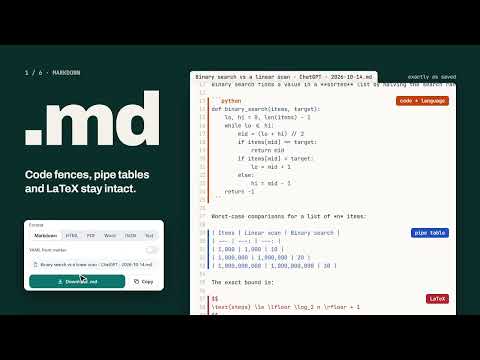
Keep the answers worth keeping. ChatSaver turns the ChatGPT, Claude or Gemini conversation in your current tab into a clean Markdown file you can drop into Obsidian, Notion, a Git repo or any document. Copy and paste mangles code blocks and tables, and the built-in exports are bulk-only or missing. ChatSaver reads the chat the way it is shown on the page and rebuilds proper Markdown from it, so what you save looks like what you read. WHY PEOPLE USE IT - One click: open a chat, click the icon, download or copy. - Private by design: the conversion runs inside your browser. Nothing is uploaded, there are no accounts and no analytics. - Minimal permissions: ChatSaver only touches a page when you click its icon. It has no standing access to any website. WHAT GETS PRESERVED - Code blocks with their language label - Tables as Markdown pipe tables - Math as LaTeX ($inline$ and $$display$$) - Headings, nested lists, task lists, quotes, links and images - Your own prompts exactly as you typed them EVERYTHING IS FREE - Download the current chat as a .md file, or copy it to the clipboard - Export or copy only the messages you select - YAML front matter with title, source, URL, date and tags for Obsidian - Custom file name templates such as {date} {title} - JSON and plain text formats as well as Markdown - Choose heading or bold speaker labels, your display name, a title heading, an export details line and dividers - Live preview of the output in settings - No paid tier, no license keys and no feature limits HOW IT WORKS 1. Open a conversation on chatgpt.com, claude.ai or gemini.google.com. 2. Click the ChatSaver icon (or press Alt+Shift+S). 3. Review the message list, then press Download or Copy. GOOD TO KNOW - ChatSaver exports what is loaded on the page. In very long Gemini chats, scroll to the top first so older messages are loaded. - Each site has its own small adapter, so updates can follow layout changes quickly. ChatSaver is an independent tool and is not affiliated with OpenAI, Anthropic or Google.
0 out of 5No ratings
Details
- Version1.0.10
- UpdatedOctober 22, 2026
- Offered byNisreen Maher
- Size73.93KiB
- LanguagesEnglish
- Developer
Email
mohelm97@gmail.com - Non-traderThis developer has not identified itself as a trader. For consumers in the European Union, please note that consumer rights do not apply to contracts between you and this developer.
Privacy

This developer declares that your data is
- Not being sold to third parties, outside of the approved use cases
- Not being used or transferred for purposes that are unrelated to the item's core functionality
- Not being used or transferred to determine creditworthiness or for lending purposes
Support
For help with questions, suggestions, or problems, please open this page on your desktop browser