

ChatMate — ChatGPT Prompt Queue

Overview
Queue a whole chain of prompts and let ChatMate run them through ChatGPT, one after another, hands-free.
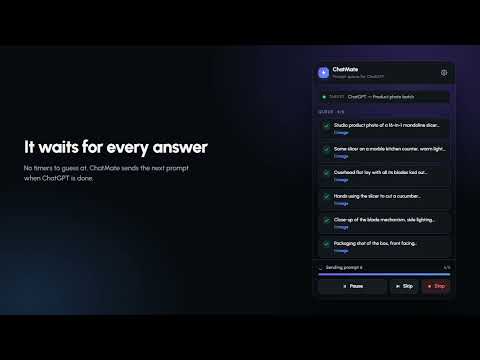
Stop babysitting ChatGPT. ChatMate turns ChatGPT into a hands-free batch processor for bulk prompts. Queue up tens or hundreds of prompts, press Run, and ChatMate sends each one to ChatGPT automatically — waiting for the full response, capturing it, and moving to the next prompt without you lifting a finger. KEY FEATURES • Bulk prompt queue — paste a list of prompts and run them unattended • Hands-free automation — auto-sends prompts one by one and waits for complete responses • Prompt chaining — feed one answer into the next prompt automatically • Chat export — save every AI response to MD, JSON, CSV or HTML • Run history — every queued run saved with its prompts and outputs WHO IT'S FOR Content creators, marketers, researchers, developers and anyone running repetitive ChatGPT workflows — generate product descriptions in bulk, summarize dozens of articles, or process datasets prompt by prompt. PRIVACY ChatMate drives the normal ChatGPT web page in your own logged-in browser. No API key needed, no separate account. Your prompts and chats stay between you and ChatGPT. HOW IT WORKS 1. Open ChatGPT and click the ChatMate icon 2. Paste or import your prompt list 3. Press Run — ChatMate sends each prompt and captures each response 4. Export everything when done Free. No subscription. Your bulk ChatGPT automation starts in one click.
0 out of 5No ratings
Details
- Version2.0.0
- UpdatedOctober 14, 2026
- Offered bythisnaeem
- Size133KiB
- LanguagesEnglish
- DeveloperNaeem Anjum
866D Central Park Housing Scheme Lahore 54000 PKEmail
naeemanjum076@gmail.com - Non-traderThis developer has not identified itself as a trader. For consumers in the European Union, please note that consumer rights do not apply to contracts between you and this developer.
Privacy

ChatMate — ChatGPT Prompt Queue has disclosed the following information regarding the collection and usage of your data. More detailed information can be found in the developer's privacy policy.
ChatMate — ChatGPT Prompt Queue handles the following:
This developer declares that your data is
- Not being sold to third parties, outside of the approved use cases
- Not being used or transferred for purposes that are unrelated to the item's core functionality
- Not being used or transferred to determine creditworthiness or for lending purposes